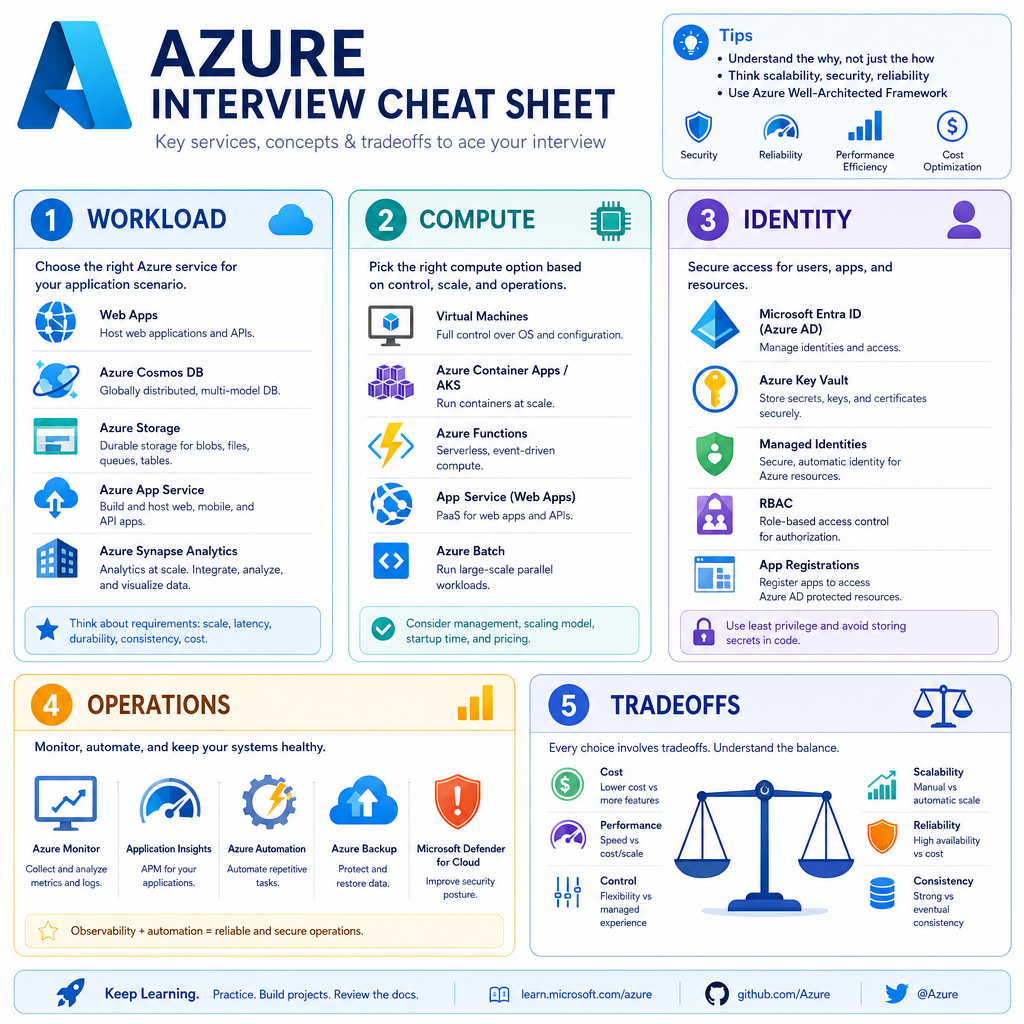
Azure Cloud Overview
Read at your own pace. Code execution, quizzes, progress tracking, and the AI tutor are available in the interactive view with JavaScript enabled.
Why Azure Matters
From pipeline to platform
Now that we've covered Introduction to CI/CD in Azure, you can describe how code moves safely from commit to production. The next interview layer is: what Azure services are you deploying into, and why?
As a senior C# backend developer, you are expected to speak beyond definitions:
- Which Azure service fits a backend API?
- Where do secrets belong?
- How do you design for outages?
- How do you explain cost, scale, and operational tradeoffs?
This lesson gives you a practical Azure overview for interviews — not a full certification dump.

Azure Mental Model
Think in layers
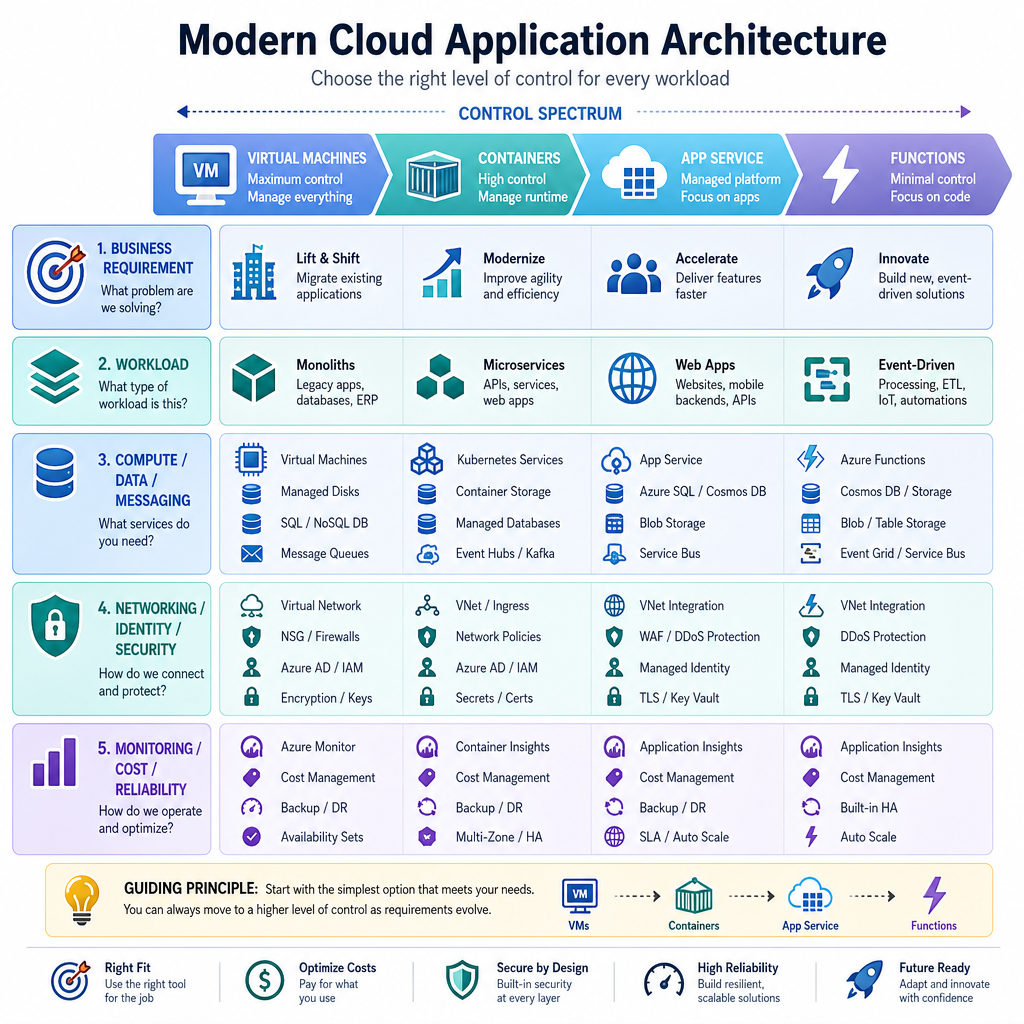
A useful Azure interview answer usually maps a business need to these layers:
Business Requirement
        ↓
Application Workload
        ↓
Compute + Data + Messaging
        ↓
Networking + Identity + Security
        ↓
Monitoring + Cost + Reliability
Azure is not just “cloud hosting.” It is a set of managed building blocks. Your job is to choose the right level of control.
Control spectrum
More control                                      Less control
VMs ───────── Containers ───────── App Service ───────── Functions
You patch OS       You package app       Azure hosts app       Azure runs events
In interviews, avoid listing services randomly. Start with the workload, then justify the service.
Resource Hierarchy
In Azure, which ordering best represents the common management hierarchy from broadest to most specific?
Core Service Map
The services interviewers expect
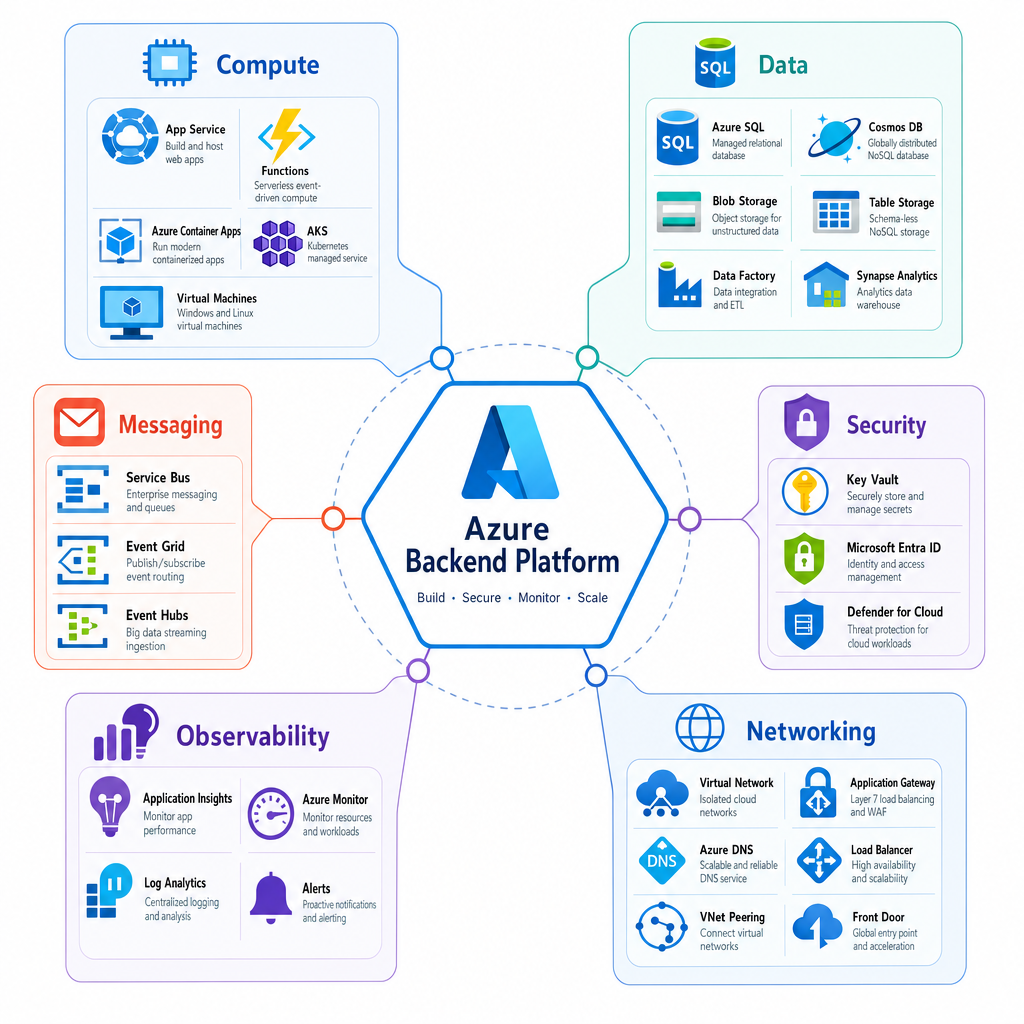
You do not need to memorize every Azure product. You should know the major categories and when they matter.
Need Common Azure options Interview framing Host an API App Service, AKS, Container Apps, VM How much control vs operational burden? Run event code Azure Functions Event-driven, serverless execution Store relational data Azure SQL Database Managed SQL Server-compatible database Store documents Cosmos DB Global distribution, low latency, flexible models Store files/objects Blob Storage Durable object storage for logs, files, media Messaging Service Bus, Event Grid, Event Hubs, Storage Queues Decoupling, events, streams, async processing Secrets Key Vault Centralized secret, key, certificate management Identity Microsoft Entra ID, Managed Identity Avoid hardcoded credentials Observability Application Insights, Azure Monitor, Log Analytics Metrics, logs, traces, alertsA strong answer connects service choice to non-functional requirements: availability, latency, throughput, compliance, cost, and team maturity.
Choosing Compute
Compute is a tradeoff decision
For backend interviews, compute choice is one of the most common Azure topics.
Quick decision guide
- App Service: great default for web APIs when you want managed hosting without Kubernetes complexity.
- Azure Functions: best for event-driven, short-running tasks like queue processing or scheduled jobs.
- Container Apps: useful when you want containers, scale-to-zero, and less cluster management.
- AKS: use when you need Kubernetes control, complex orchestration, or a platform team can operate it.
- Virtual Machines: use for legacy workloads or full OS control, but expect more maintenance.
The answer is rarely “AKS because microservices.” In the upcoming Microservices Architecture lesson, we will go deeper into service boundaries — here, focus on Azure hosting fit.
```csharp
using System;

public class Program
{
    public static void Main()
    {
        Console.WriteLine(RecommendCompute(
            isHttpApi: true,
            needsKubernetesControl: false,
            isEventDriven: false,
            requiresFullOsControl: false));

        Console.WriteLine(RecommendCompute(
            isHttpApi: false,
            needsKubernetesControl: false,
            isEventDriven: true,
            requiresFullOsControl: false));
    }

    static string RecommendCompute(
        bool isHttpApi,
        bool needsKubernetesControl,
        bool isEventDriven,
        bool requiresFullOsControl)
    {
        if (requiresFullOsControl) return "Consider Azure Virtual Machines.";
        if (needsKubernetesControl) return "Consider Azure Kubernetes Service (AKS).";
        if (isEventDriven) return "Consider Azure Functions.";
        if (isHttpApi) return "Consider Azure App Service as a strong default.";
        return "Consider Azure Container Apps for containerized workloads with managed scaling.";
    }
}
```
Scaling Assumption
True or false: If a C# API is hosted on Azure App Service, you no longer need to think about scaling, latency, or failure handling.
Identity First Security
Avoid secret-centered design
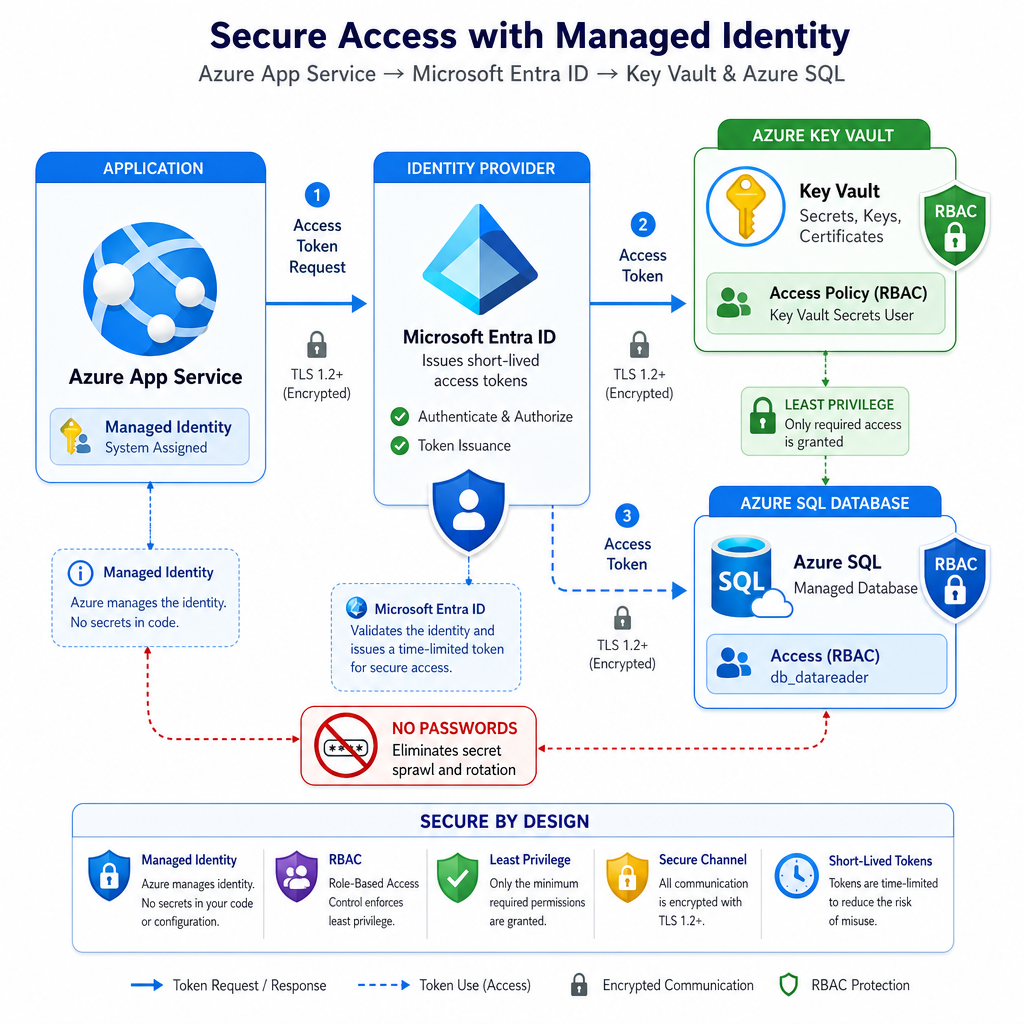
A common senior-level Azure interview signal is saying: do not put credentials in appsettings.json, environment variables, or pipeline variables unless there is a strong reason. Prefer identity-based access.
Key concepts
- Microsoft Entra ID: Azure's identity platform.
- Managed Identity: gives an Azure resource an identity without storing credentials.
- RBAC: grants that identity permissions to resources.
- Key Vault: stores secrets, keys, and certificates centrally.
Example answer
“For an App Service accessing Azure SQL or Key Vault, I would prefer Managed Identity with least-privilege RBAC. That avoids secret rotation problems and reduces leakage risk.”
This connects directly to the CI/CD lesson: your pipeline should deploy configuration and infrastructure safely, but it should not become a dumping ground for production passwords.
Secretless Access
Fill in the blank: In Azure, a workload can authenticate to other Azure resources without storing credentials by using a ______.
Reliability Basics
Cloud reliability is designed, not assumed
Azure gives you building blocks, but your system still needs reliability choices.
Terms to know
- Region: geographic area containing Azure datacenters.
- Availability Zone: physically separate datacenter group within a region.
- SLA: Microsoft’s availability commitment for a service/configuration.
- Retry: useful for transient faults, but dangerous if unlimited.
- Circuit breaker: stops repeated calls to a failing dependency for a period.
- Monitoring: detects issues through metrics, logs, traces, and alerts.
Senior interview phrasing:
“I would design for transient failures with bounded retries, timeouts, idempotent operations, and observability. For critical systems, I would also consider zone redundancy or multi-region recovery depending on RTO/RPO and cost.”
```csharp
using System;

public class Program
{
    static int attempts = 0;

    public static void Main()
    {
        try
        {
            string result = Retry(maxAttempts: 3, operation: SimulateCloudCall);
            Console.WriteLine($"Success: {result}");
        }
        catch (Exception ex)
        {
            Console.WriteLine($"Failed after retries: {ex.Message}");
        }
    }

    static string Retry(int maxAttempts, Func<string> operation)
    {
        for (int attempt = 1; attempt <= maxAttempts; attempt++)
        {
            try
            {
                Console.WriteLine($"Attempt {attempt}");
                return operation();
            }
            catch (TimeoutException) when (attempt < maxAttempts)
            {
                Console.WriteLine("Transient timeout. Retrying...");
            }
        }

        return operation();
    }

    static string SimulateCloudCall()
    {
        attempts++;
        if (attempts < 3)
        {
            throw new TimeoutException("Temporary dependency issue");
        }

        return "Dependency responded";
    }
}
```
Backend Scenario
You are designing a C# backend API on Azure. It needs managed web hosting, secure access to secrets, telemetry, and asynchronous communication with worker services. Which combination is the best fit?
Azure Cheat Sheet
Interview-ready summary
Use this structure when answering Azure overview questions.
1. Start from the workload
“Is it an API, background worker, event handler, data pipeline, or legacy app?”
2. Choose compute deliberately
- App Service for many C# APIs
- Functions for event-driven tasks
- Container Apps for managed containers
- AKS only when Kubernetes control is justified
- VMs when OS-level control is required
3. Secure with identity
Prefer Managed Identity + RBAC + Key Vault over stored credentials.
4. Design for operations
Mention monitoring, logs, metrics, alerts, scaling, cost, and failure handling.
5. Give tradeoffs
A senior answer is not “Azure has service X.” A senior answer is:
“Given these requirements, I would choose X because it optimizes for Y, while accepting tradeoff Z.”
Next, we’ll shift from platform overview to Advanced C# Techniques, where your implementation-level depth becomes the focus.