Building a RESTful Web Service
Read at your own pace. Code execution, quizzes, progress tracking, and the AI tutor are available in the interactive view with JavaScript enabled.
From Classes To APIs
Why this matters
In Project Setup and Version Control, you created a clean baseline. In Design Patterns in Java, you learned how to organize behavior so code can evolve.
Now we turn that Java code into something other programs can use: a RESTful Web Service.
By the end of this lesson, you should be able to design and implement a small HTTP API with:
- Resource-based URLs
- HTTP methods like
GETandPOST - JSON responses
- Clear separation between endpoint logic and business logic
Think of this as the first real doorway into backend project architecture.
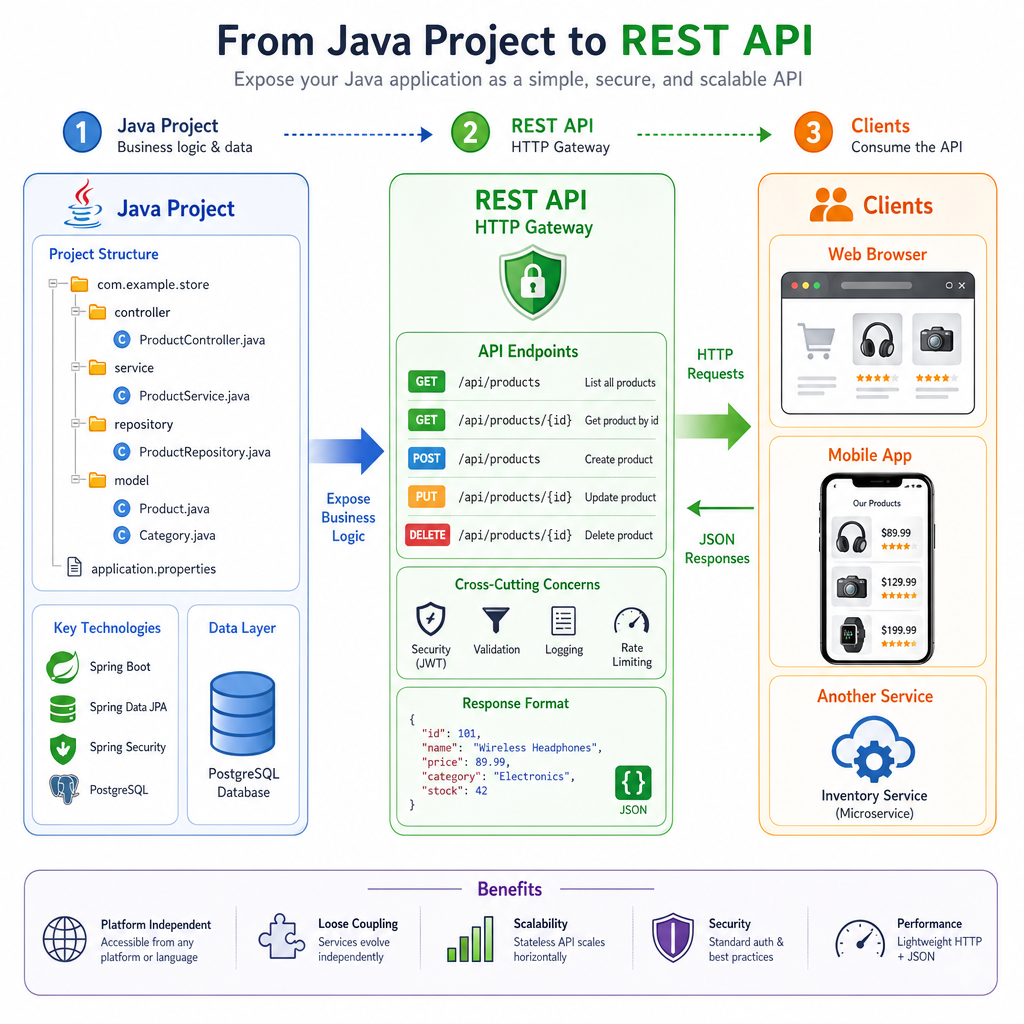
REST Mental Model
REST is about resources
A REST API exposes resources through URLs.
Instead of thinking:
doCreateProject()runDeleteProject()fetchProjectDataNow()
Think:
GET /api/projectsGET /api/projects/42POST /api/projectsDELETE /api/projects/42
The URL names the thing. The HTTP method describes the action.
Common mapping
Intent HTTP Method Example List resourcesGET
/api/projects
Read one resource
GET
/api/projects/42
Create resource
POST
/api/projects
Replace resource
PUT
/api/projects/42
Partially update
PATCH
/api/projects/42
Delete resource
DELETE
/api/projects/42
This lesson stays focused on the web-service layer. In the next lesson, Database Integration with Hibernate, these resources will stop living only in memory.
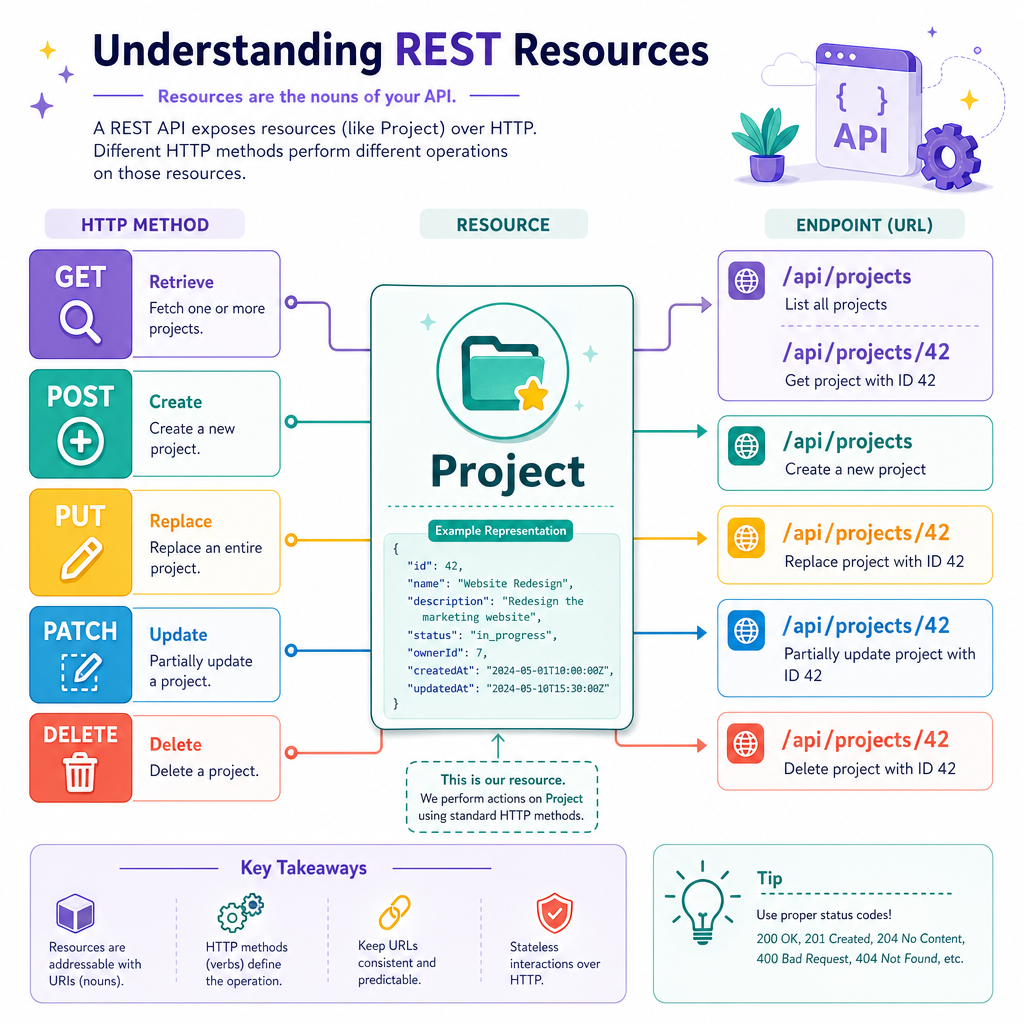
Design The Contract
Contract before code
A production-style API starts with a small contract. The contract tells frontend developers, mobile apps, and other services what they can call.
For our mini project service, we will use this first contract:
Endpoint Meaning Success StatusGET /api/health
Check if service is alive
200
GET /api/projects
List projects
200
POST /api/projects
Create a project
201
Why status codes matter
Status codes are part of your design:
-
200 OK: request worked -
201 Created: resource was created -
400 Bad Request: client sent invalid data -
404 Not Found: resource does not exist -
405 Method Not Allowed: URL exists, method is wrong
Good APIs are predictable. Predictability is an architecture feature, not just a documentation feature.
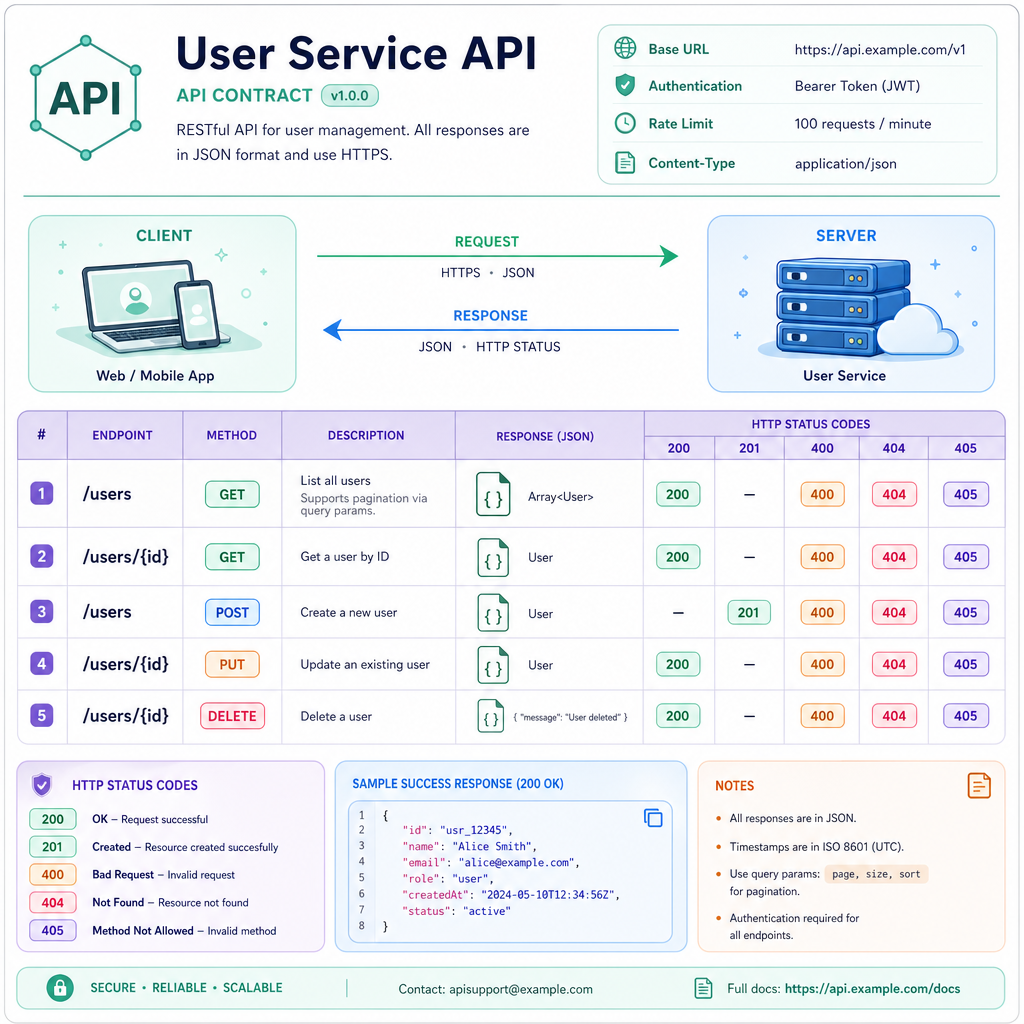
Endpoint Design Check
You need an endpoint that retrieves the project with ID 42.
Which endpoint design is most RESTful?
Minimal Java Service
A tiny REST server in plain Java
Frameworks like Spring Boot are common in real projects, but the core idea is simply this:
- Receive an HTTP request
- Inspect the method and path
- Run Java logic
- Return status code + JSON
The following standalone example uses Java's built-in lightweight HTTP server. It gives us a working REST-style service without hiding the mechanics.
```java
import com.sun.net.httpserver.HttpExchange;
import com.sun.net.httpserver.HttpServer;

import java.io.IOException;
import java.io.OutputStream;
import java.net.InetSocketAddress;
import java.nio.charset.StandardCharsets;
import java.time.Instant;
import java.util.ArrayList;
import java.util.List;

public class SimpleRestServer {
    private static final List<String> projects = new ArrayList<>(List.of(
            "REST Service Skeleton",
            "Versioned Java Project"
    ));

    public static void main(String[] args) throws Exception {
        HttpServer server = HttpServer.create(new InetSocketAddress(8080), 0);

        server.createContext("/api/health", exchange -> {
            if (!exchange.getRequestMethod().equals("GET")) {
                send(exchange, 405, "{\"error\":\"Method not allowed\"}");
                return;
            }
            send(exchange, 200, "{\"status\":\"UP\",\"time\":\"" + Instant.now() + "\"}");
        });

        server.createContext("/api/projects", exchange -> {
            String method = exchange.getRequestMethod();

            if (method.equals("GET")) {
                send(exchange, 200, toJsonProjects());
            } else if (method.equals("POST")) {
                String name = "New Project " + (projects.size() + 1);
                projects.add(name);
                send(exchange, 201, "{\"message\":\"created\",\"name\":\"" + name + "\"}");
            } else {
                send(exchange, 405, "{\"error\":\"Method not allowed\"}");
            }
        });

        server.start();
        System.out.println("Server running at http://localhost:8080");
        System.out.println("Try: GET  /api/health");
        System.out.println("Try: GET  /api/projects");
        System.out.println("Try: POST /api/projects");
    }

    private static String toJsonProjects() {
        StringBuilder json = new StringBuilder("[");
        for (int i = 0; i < projects.size(); i++) {
            if (i > 0) json.append(",");
            json.append("{\"id\":").append(i + 1)
                .append(",\"name\":\"").append(projects.get(i)).append("\"}");
        }
        return json.append("]").toString();
    }

    private static void send(HttpExchange exchange, int status, String body) throws IOException {
        byte[] bytes = body.getBytes(StandardCharsets.UTF_8);
        exchange.getResponseHeaders().set("Content-Type", "application/json; charset=utf-8");
        exchange.sendResponseHeaders(status, bytes.length);

        try (OutputStream output = exchange.getResponseBody()) {
            output.write(bytes);
        }

        System.out.println(exchange.getRequestMethod() + " " + exchange.getRequestURI() + " -> " + status);
    }
}
```
Layered Source Layout
Keep endpoint code thin
A common beginner mistake is placing every rule directly inside the HTTP handler or controller.
Real-time projects usually separate responsibilities:
src/main/java/com/example/projects
├── api
│   └── ProjectController.java      // HTTP methods, status codes, JSON shape
├── service
│   └── ProjectService.java         // business rules and use cases
├── repository
│   └── ProjectRepository.java      // persistence boundary
└── model
    └── Project.java                // domain data
This connects directly to Design Patterns in Java:
-
ProjectRepositoryis a boundary/interface -
ProjectServicedepends on behavior, not storage details - Later, the storage implementation can change without rewriting endpoint logic
For now, our repository can be in-memory. In the Hibernate lesson, that boundary will become much more valuable.
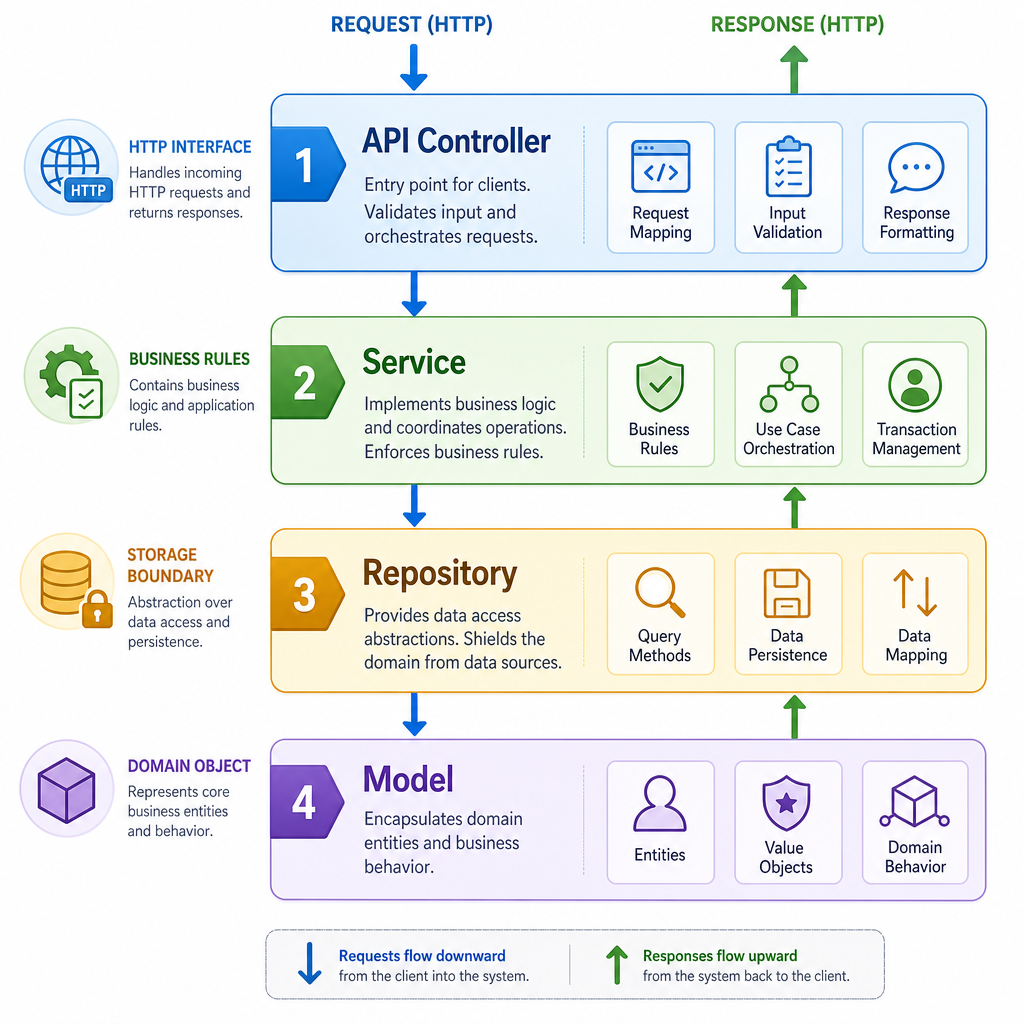
Service Layer Demo
Business logic belongs outside the endpoint
The service layer should answer questions like:
- Is the input valid?
- What operation should happen?
- Which repository method is needed?
The endpoint layer should mostly translate HTTP into service calls and service results back into HTTP responses.
Here is a standalone Java version of that separation.
```java
import java.util.ArrayList;
import java.util.List;
import java.util.Optional;

public class ProjectServiceDemo {
    public static void main(String[] args) {
        ProjectRepository repository = new InMemoryProjectRepository();
        ProjectService service = new ProjectService(repository);

        System.out.println(service.create("RESTful Web Service"));
        System.out.println(service.create("Real-time Chat Prototype"));
        System.out.println(service.findById(1));
        System.out.println(service.list());
    }

    static class Project {
        private final int id;
        private final String name;

        Project(int id, String name) {
            this.id = id;
            this.name = name;
        }

        @Override
        public String toString() {
            return "Project{id=" + id + ", name='" + name + "'}";
        }
    }

    interface ProjectRepository {
        Project save(String name);
        Optional<Project> findById(int id);
        List<Project> findAll();
    }

    static class InMemoryProjectRepository implements ProjectRepository {
        private final List<Project> projects = new ArrayList<>();
        private int nextId = 1;

        public Project save(String name) {
            Project project = new Project(nextId++, name);
            projects.add(project);
            return project;
        }

        public Optional<Project> findById(int id) {
            return projects.stream()
                    .filter(project -> project.id == id)
                    .findFirst();
        }

        public List<Project> findAll() {
            return new ArrayList<>(projects);
        }
    }

    static class ProjectService {
        private final ProjectRepository repository;

        ProjectService(ProjectRepository repository) {
            this.repository = repository;
        }

        Project create(String rawName) {
            String name = rawName == null ? "" : rawName.trim();
            if (name.length() < 3) {
                throw new IllegalArgumentException("Project name must have at least 3 characters");
            }
            return repository.save(name);
        }

        Optional<Project> findById(int id) {
            return repository.findById(id);
        }

        List<Project> list() {
            return repository.findAll();
        }
    }
}
```
REST Principle Swipe
A RESTful web service should store the current user's last request in a server-side field so the next endpoint call can infer what to do.
Status And Errors
Make failures explicit
A useful API does not only return happy-path data. It also gives clients predictable errors.
Your service layer may produce outcomes like:
- success
- validation error
- not found
Your API layer maps those outcomes to HTTP responses.
That mapping is architecture glue: it keeps business rules separate from transport details.
```java
public class ApiResultDemo {
    public static void main(String[] args) {
        System.out.println(toHttpResponse(ApiResult.ok("Project created")));
        System.out.println(toHttpResponse(ApiResult.validationError("Name is required")));
        System.out.println(toHttpResponse(ApiResult.notFound("Project 99 was not found")));
    }

    static HttpResponse toHttpResponse(ApiResult result) {
        if (result.type == ResultType.OK) {
            return new HttpResponse(200, "{\"message\":\"" + result.message + "\"}");
        }
        if (result.type == ResultType.VALIDATION_ERROR) {
            return new HttpResponse(400, "{\"error\":\"" + result.message + "\"}");
        }
        return new HttpResponse(404, "{\"error\":\"" + result.message + "\"}");
    }

    enum ResultType {
        OK,
        VALIDATION_ERROR,
        NOT_FOUND
    }

    static class ApiResult {
        private final ResultType type;
        private final String message;

        private ApiResult(ResultType type, String message) {
            this.type = type;
            this.message = message;
        }

        static ApiResult ok(String message) {
            return new ApiResult(ResultType.OK, message);
        }

        static ApiResult validationError(String message) {
            return new ApiResult(ResultType.VALIDATION_ERROR, message);
        }

        static ApiResult notFound(String message) {
            return new ApiResult(ResultType.NOT_FOUND, message);
        }
    }

    static class HttpResponse {
        private final int status;
        private final String body;

        HttpResponse(int status, String body) {
            this.status = status;
            this.body = body;
        }

        @Override
        public String toString() {
            return "HTTP " + status + " " + body;
        }
    }
}
```
HTTP Verb Fill
To create a new resource in a collection endpoint such as /api/projects, the conventional HTTP method is ____.