Connectivity with Financial Market APIs
Read at your own pace. Code execution, quizzes, progress tracking, and the AI tutor are available in the interactive view with JavaScript enabled.
Bridge To Live Markets
Why this lesson matters
In Data Handling and Management in C++, you shaped market data into useful C++ structures and learned to guard against bad input. Now we connect that internal world to the outside world: financial market APIs.
An algo trading application is usually a fast loop:
Market API → Market Data → Your C++ App → Order API → Broker/Exchange
Today we focus on connectivity, not strategy logic. By the end, you should understand:
- Which API style fits which job
- How requests, authentication, and rate limits work
- How to parse incoming data into your existing C++ structures
- How to think about reconnects and API failures without freezing your app
Next lesson, Implementing Trading Algorithms, will use these connections as the input/output layer for decisions.

API Types Map
The three common connectivity styles
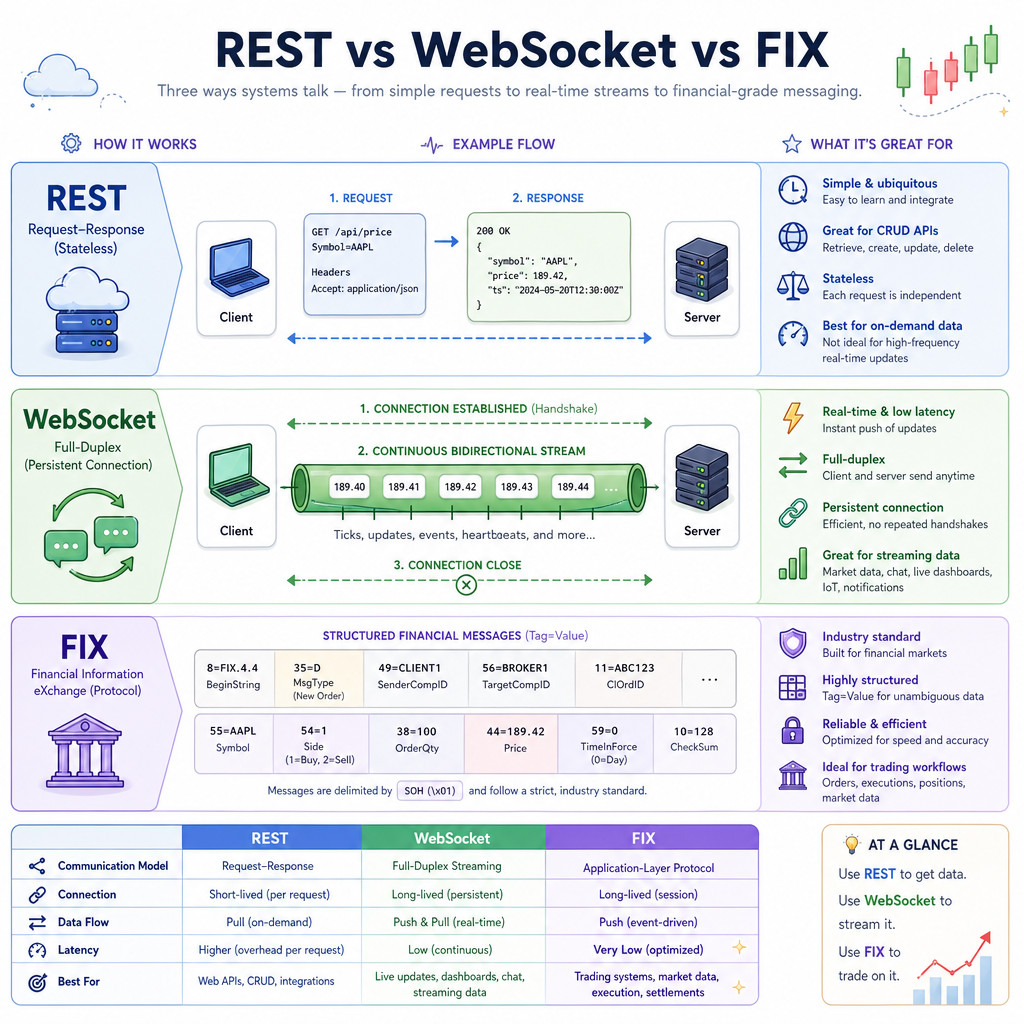
Financial platforms expose different APIs depending on speed, reliability, and market access needs.
API style Common use Mental model REST / HTTP Account info, placing simple orders, fetching historical candles Ask a question, receive a response WebSocket Live prices, trade updates, order status streams Keep a pipe open; messages arrive continuously FIX Professional low-latency order routing Strict financial messaging protocolFor an intermediate C++ developer building a first serious algo app, a practical path is:
- Start with REST for simple broker/account operations.
- Add WebSocket for live market data.
- Consider FIX only when your broker/exchange and latency requirements justify it.
The important design idea: keep the API-specific code at the edge. Your core app should receive normalized C++ objects like Tick, OrderUpdate, or AccountSnapshot, not raw vendor-specific strings everywhere.
Choose The Stream
You need your C++ app to receive live price updates continuously as the market moves.
Which API style is usually the best fit?
Authentication And Limits
Connectivity is not just networking
Most financial APIs require you to handle operational rules correctly.
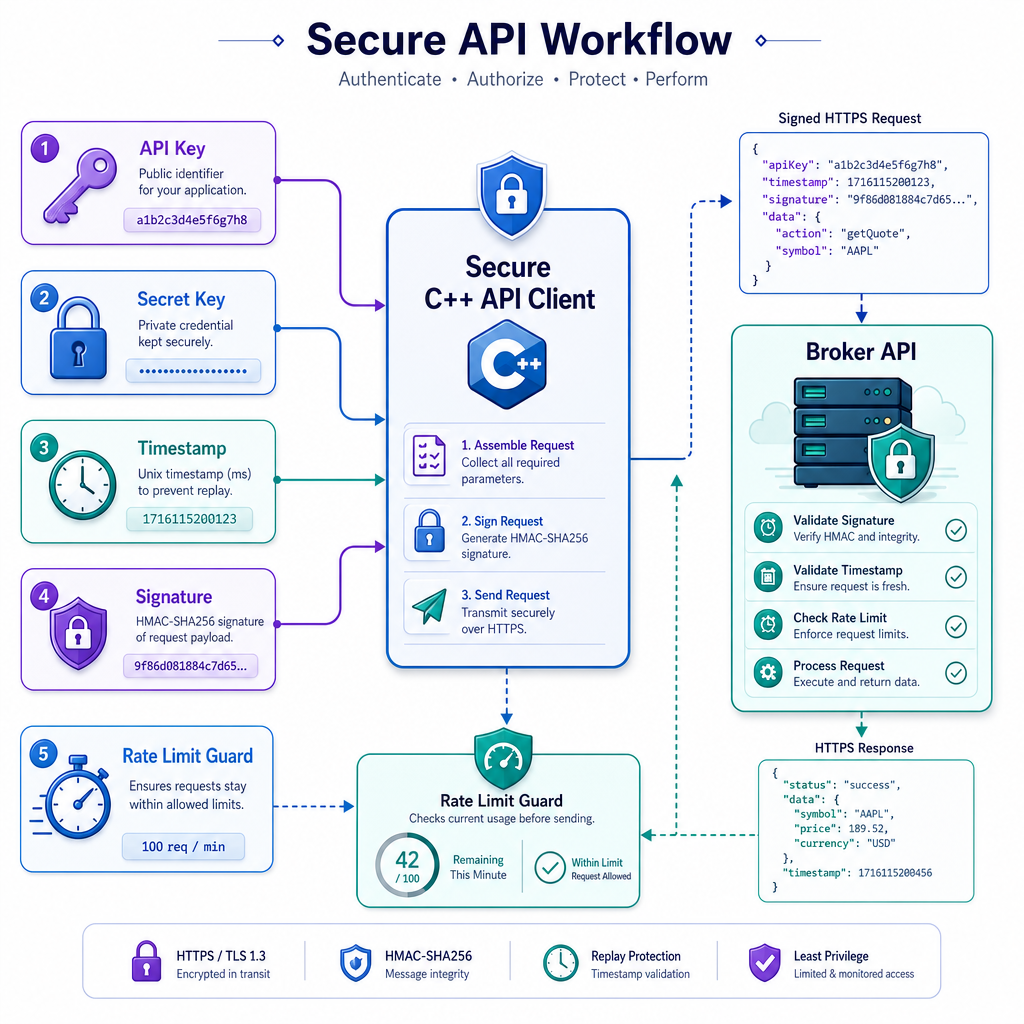
Common requirements
- API key: identifies your application/account.
- Secret key: used to sign requests; treat it like a password.
- Timestamp / nonce: prevents replay attacks.
- Signature: proves the request came from someone holding the secret.
- Rate limits: restrict how many requests you can make per time window.
- Environment selection: sandbox/paper trading vs live trading.
Practical C++ design
Keep credentials outside source code:
config file / environment variable → Config loader → API client
Also plan for API failures from day one. A market API can return:
-
200 OK: request succeeded -
401 Unauthorized: bad/missing credentials -
429 Too Many Requests: rate limited -
500+: server-side issue
Your app should log these clearly and avoid blindly retrying at full speed.
Signed Request Shape
Build request objects before sending them
In production you might use libcurl, Boost.Beast, Poco, or a broker SDK to send HTTP requests. But before any network call, your program should create a clear request object containing:
- HTTP method
- endpoint path
- query/body parameters
- authentication headers
- timestamp
The example below uses a demo signature so it runs with only the C++ standard library. Real trading APIs usually require HMAC-SHA256 or another official signing algorithm from their documentation.
```cpp
#include <iostream>
#include <string>
#include <map>
#include <sstream>
#include <functional>

struct ApiRequest {
    std::string method;
    std::string path;
    std::map<std::string, std::string> headers;
    std::string body;
};

std::string demoSignature(const std::string& secret, const std::string& payload) {
    // Demo only: std::hash is NOT cryptographic.
    std::hash<std::string> hasher;
    return std::to_string(hasher(secret + ":" + payload));
}

ApiRequest buildOrderPreviewRequest(
    const std::string& apiKey,
    const std::string& secret,
    const std::string& symbol,
    int quantity,
    long long timestampMs
) {
    std::ostringstream body;
    body << "{\"symbol\":\"" << symbol << "\",\"qty\":" << quantity << "}";

    std::string payload = "POST" + std::string("/v1/orders/preview") + body.str() + std::to_string(timestampMs);
    std::string signature = demoSignature(secret, payload);

    ApiRequest req;
    req.method = "POST";
    req.path = "/v1/orders/preview";
    req.body = body.str();
    req.headers["X-API-KEY"] = apiKey;
    req.headers["X-TIMESTAMP-MS"] = std::to_string(timestampMs);
    req.headers["X-SIGNATURE"] = signature;
    req.headers["Content-Type"] = "application/json";
    return req;
}

int main() {
    ApiRequest req = buildOrderPreviewRequest(
        "demo_key_123",
        "demo_secret_abc",
        "AAPL",
        10,
        1717000000123LL
    );

    std::cout << req.method << " " << req.path << "\n";
    std::cout << "Headers:\n";
    for (const auto& [name, value] : req.headers) {
        std::cout << "  " << name << ": " << value << "\n";
    }
    std::cout << "Body: " << req.body << "\n";
}
```
Protect The Secret
True or false:
It is safe to hardcode your live trading API secret directly in a C++ source file if the repository is private.
Parse Into Objects
Normalize vendor messages early
Different brokers may send different field names and JSON shapes. Your trading core should not care about every vendor detail.
A useful pattern is:
Raw API response → Adapter/parser → Internal C++ struct
This builds directly on Data Handling and Management in C++, where you used meaningful structs for market data.
The example below parses a tiny known JSON-like message into a Tick. In real projects, use a reliable JSON library such as nlohmann/json, RapidJSON, or simdjson. The goal here is the architecture: convert external data into internal objects as soon as possible.
```cpp
#include <iostream>
#include <string>
#include <optional>

struct Tick {
    std::string symbol;
    double bid;
    double ask;
    long long timestampMs;
};

std::optional<std::string> extractString(const std::string& json, const std::string& key) {
    std::string pattern = "\"" + key + "\":\"";
    std::size_t start = json.find(pattern);
    if (start == std::string::npos) return std::nullopt;
    start += pattern.size();
    std::size_t end = json.find("\"", start);
    if (end == std::string::npos) return std::nullopt;
    return json.substr(start, end - start);
}

std::optional<double> extractDouble(const std::string& json, const std::string& key) {
    std::string pattern = "\"" + key + "\":";
    std::size_t start = json.find(pattern);
    if (start == std::string::npos) return std::nullopt;
    start += pattern.size();
    std::size_t end = json.find_first_of(",}", start);
    if (end == std::string::npos) return std::nullopt;
    return std::stod(json.substr(start, end - start));
}

std::optional<long long> extractLongLong(const std::string& json, const std::string& key) {
    auto value = extractDouble(json, key);
    if (!value) return std::nullopt;
    return static_cast<long long>(*value);
}

std::optional<Tick> parseTick(const std::string& raw) {
    auto symbol = extractString(raw, "symbol");
    auto bid = extractDouble(raw, "bid");
    auto ask = extractDouble(raw, "ask");
    auto ts = extractLongLong(raw, "ts");

    if (!symbol || !bid || !ask || !ts) return std::nullopt;
    if (*bid <= 0 || *ask <= 0 || *bid > *ask) return std::nullopt;

    return Tick{*symbol, *bid, *ask, *ts};
}

int main() {
    std::string apiMessage = "{\"symbol\":\"MSFT\",\"bid\":430.10,\"ask\":430.15,\"ts\":1717000000456}";

    auto tick = parseTick(apiMessage);
    if (tick) {
        std::cout << "Parsed tick: "
                  << tick->symbol << " bid=" << tick->bid
                  << " ask=" << tick->ask
                  << " ts=" << tick->timestampMs << "\n";
    } else {
        std::cout << "Invalid market data message\n";
    }
}
```
Rate Limit Code
Fill in the blank:
The common HTTP status code for Too Many Requests is ___.
Fill in the blank: _____________
Reconnect Lifecycle
Live connections must recover
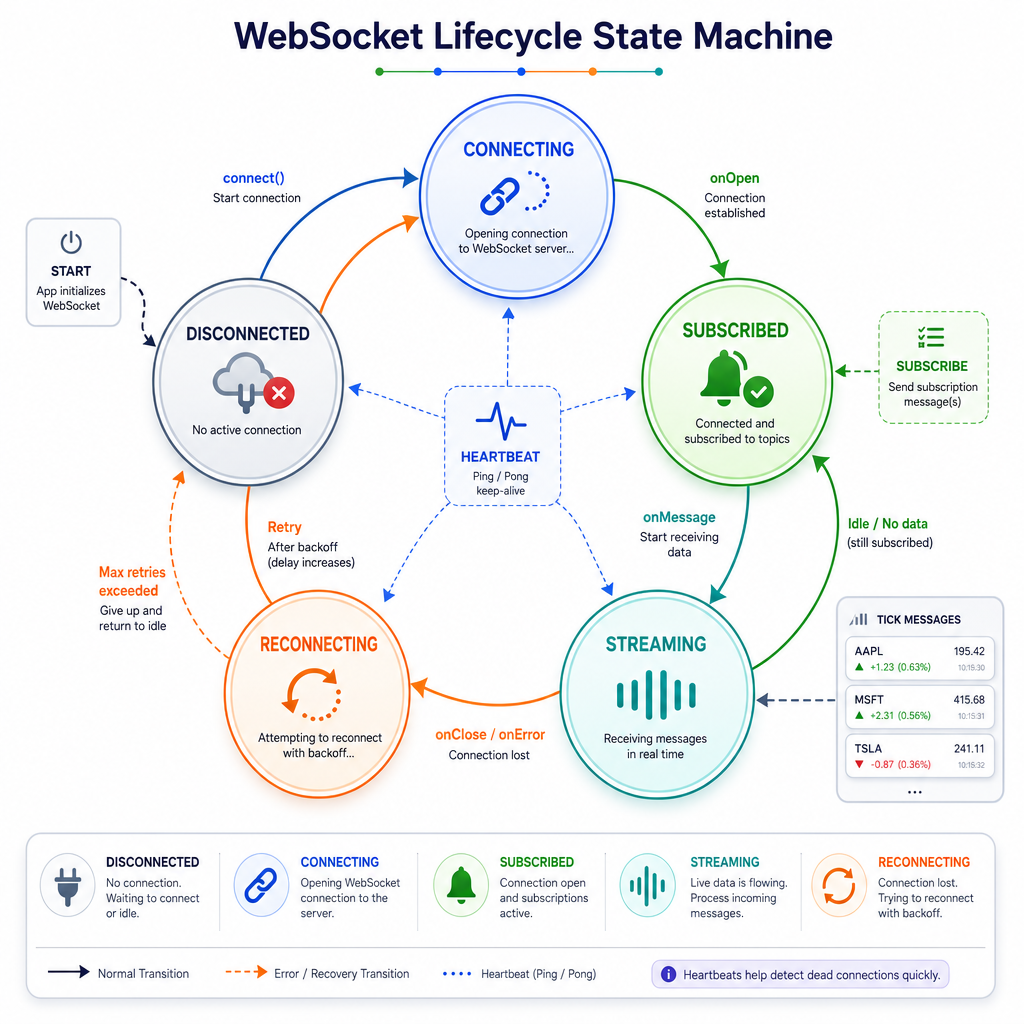
A live trading app should assume that network connections sometimes fail. The goal is not to avoid every failure; the goal is to recover safely and predictably.
A simple WebSocket-style lifecycle:
DISCONNECTED
    ↓ connect
CONNECTING
    ↓ success
SUBSCRIBED
    ↓ messages flowing
STREAMING
    ↓ timeout/error
RECONNECTING
    ↓ backoff + resubscribe
STREAMING
Important behaviors
- Log connection state changes.
- Use heartbeat or timeout checks.
- Back off before reconnecting.
- Resubscribe after reconnecting.
- Deduplicate messages using sequence numbers or timestamps.
This keeps your app stable enough for the strategy layer you will build next.
Connection State Demo
Simulate resilience before going live
Before connecting to a real broker, simulate the ugly cases: duplicate messages, dropped connections, and reconnect attempts.
The code below does not open a socket. Instead, it models the behavior your API client should eventually have: process ordered messages, ignore duplicates, notice a simulated failure, and reconnect with increasing backoff.
```cpp
#include <iostream>
#include <vector>
#include <string>

struct StreamMessage {
    int sequence;
    std::string payload;
};

class MarketStreamClient {
public:
    void connect() {
        connected = true;
        std::cout << "Connected and subscribed to market data\n";
    }

    void disconnect(const std::string& reason) {
        connected = false;
        std::cout << "Disconnected: " << reason << "\n";
    }

    void reconnectWithBackoff(int attempt) {
        int waitMs = 100 * attempt * attempt;
        std::cout << "Reconnect attempt " << attempt
                  << " after " << waitMs << " ms backoff\n";
        connect();
    }

    void onMessage(const StreamMessage& msg) {
        if (!connected) {
            std::cout << "Ignored message while disconnected: seq=" << msg.sequence << "\n";
            return;
        }
        if (msg.sequence <= lastSequence) {
            std::cout << "Duplicate/out-of-order ignored: seq=" << msg.sequence << "\n";
            return;
        }
        lastSequence = msg.sequence;
        std::cout << "Accepted seq=" << msg.sequence
                  << " payload=" << msg.payload << "\n";
    }

private:
    bool connected = false;
    int lastSequence = 0;
};

int main() {
    MarketStreamClient client;
    client.connect();

    std::vector<StreamMessage> messages = {
        {1, "AAPL bid=189.10 ask=189.12"},
        {2, "AAPL bid=189.11 ask=189.13"},
        {2, "AAPL duplicate"},
        {3, "AAPL bid=189.09 ask=189.11"}
    };

    for (const auto& msg : messages) {
        client.onMessage(msg);
    }

    client.disconnect("heartbeat timeout");
    client.onMessage({4, "message during outage"});

    client.reconnectWithBackoff(1);
    client.onMessage({4, "AAPL bid=189.20 ask=189.22"});
    client.onMessage({5, "AAPL bid=189.21 ask=189.23"});
}
```