Dockerfile Debugging Basics
Read at your own pace. Code execution, quizzes, progress tracking, and the AI tutor are available in the interactive view with JavaScript enabled.
Debug The Recipe
Now that we’ve covered Building and Using Docker Containers and Images, you can build an image and start a container.
The next skill is figuring out what went wrong when Docker says no.
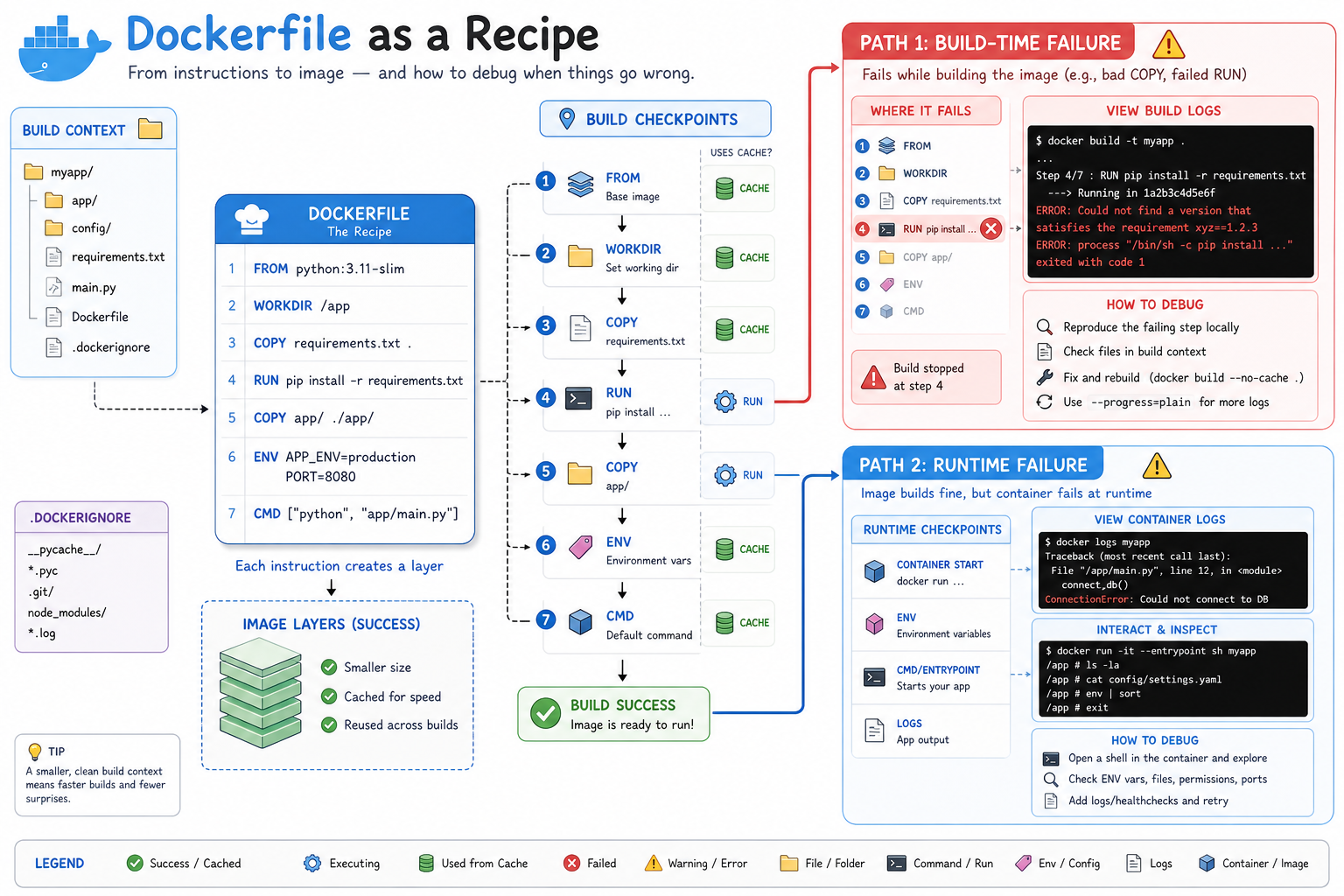
A Dockerfile is a recipe, and debugging it means asking one precise question at a time:
Did the failure happen while building the image?
             or
Did the image build, but the container failed when it ran?
That split matters because the tools are different:
-
Build failure: inspect
docker buildoutput, build context,COPY,RUN, cache, and layers. -
Runtime failure: inspect
docker run, logs, environment variables, entrypoint, command, and files inside the container.
This lesson is a practical debugging loop you can use locally before a broken Dockerfile wastes CI/CD time.
CONTINUE WITH ALGODAILY PREMIUM
Keep going with the complete tutorial.
Unlock the remaining explanations and exercises, alongside the full learning library.
Explore Premium →