File Handling in C++
Read at your own pace. Code execution, quizzes, progress tracking, and the AI tutor are available in the interactive view with JavaScript enabled.
From Memory To Files
Your programs can now remember
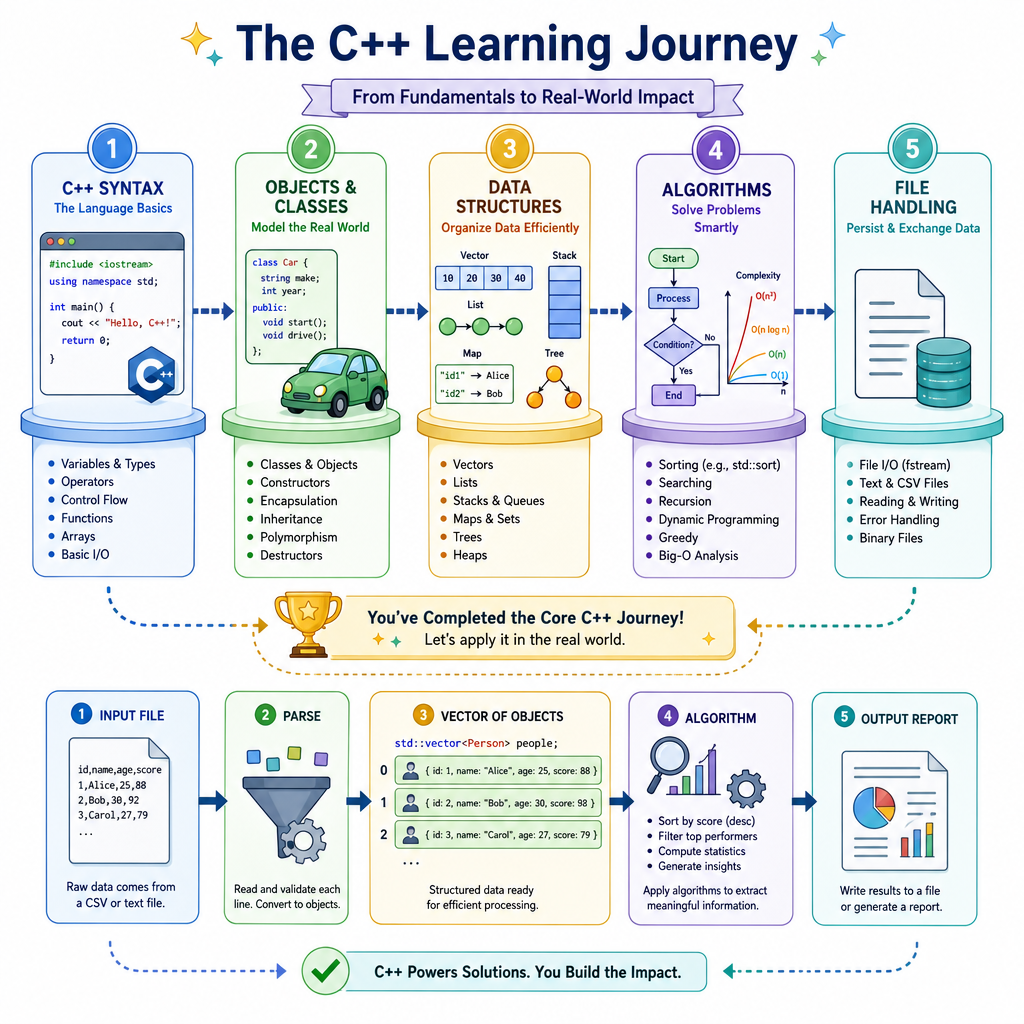
In Introduction to C++, you learned how a C++ program runs. In Object-Oriented Programming in C++, you organized behavior into classes. In Data Structures in C++, you held collections in memory. In Algorithms in C++, you processed those collections efficiently.
Now we connect those skills to the outside world.
File handling lets your program:
- Save results after it exits
- Load configuration or datasets
- Process logs, CSVs, reports, and model outputs
- Build small real-world tools, like a portfolio tracker or data cleaner
A useful mental shift:
Memory: fast, temporary
Files: slower, persistent
By the end, you will be able to write data to a file, read it back, check for errors, and parse simple structured records.

Streams For Files
Files use the stream idea
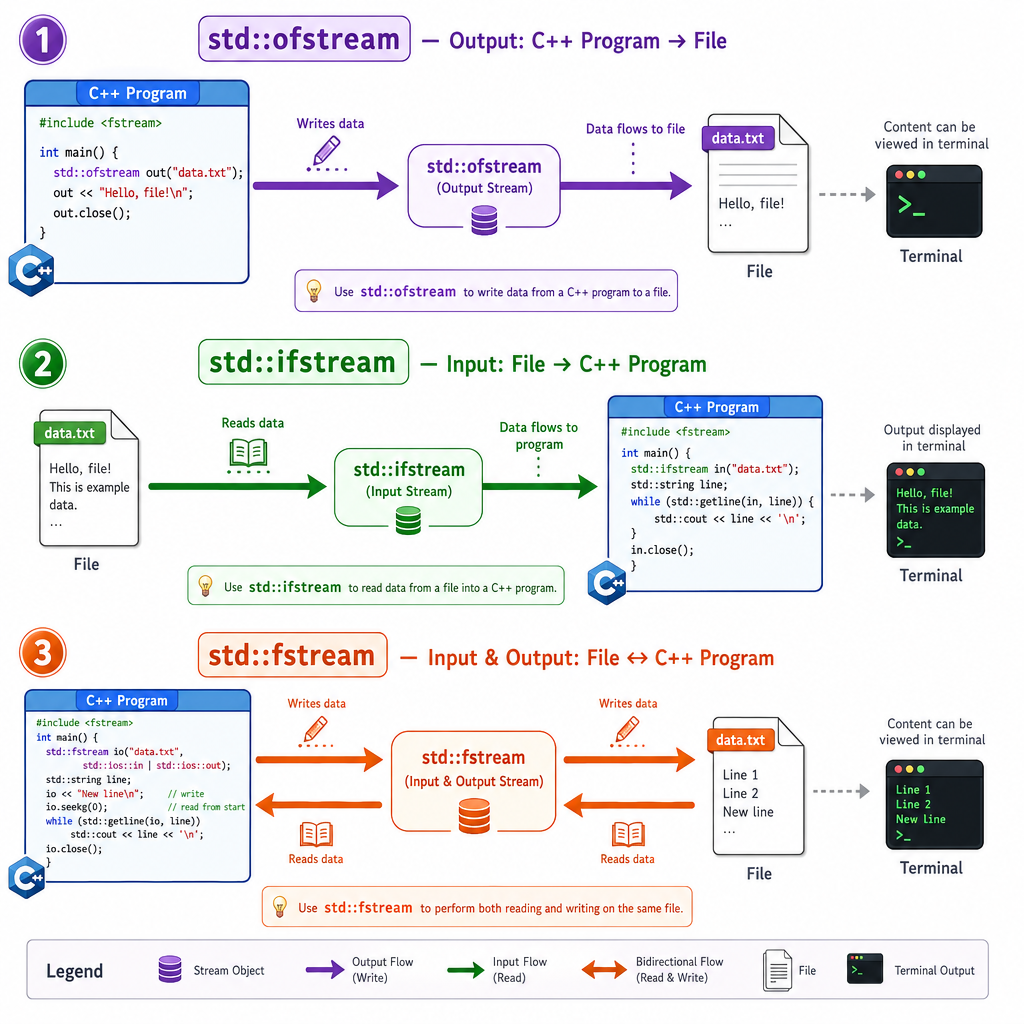
C++ file handling is built around streams: ordered flows of data.
You already used a stream when printing with std::cout. File streams work similarly, except the destination or source is a file instead of the terminal.
Common file stream types:
Type Direction Usestd::ofstream
output
Write to a file
std::ifstream
input
Read from a file
std::fstream
both
Read and write
You get these from the <fstream> header.
A key C++ habit: open the file, check that it opened, then read or write. When the stream object goes out of scope, C++ closes the file for you. This is the same resource-management mindset you saw when objects controlled state in Object-Oriented Programming in C++.
Write Then Read
A complete file round trip
Here is the smallest useful pattern: write data, close the writer, open a reader, then read the data back.
This example creates a tiny text file named prices.txt. Each line is just text, but the program can still process it one line at a time.
Notice the familiar loop pattern from earlier lessons: the data source changed, but the control flow is still normal C++.
```cpp
#include <fstream>
#include <iostream>
#include <string>

int main() {
    // Write data to a file.
    std::ofstream out("prices.txt");
    out << "AAPL 189.50\n";
    out << "MSFT 420.25\n";
    out << "NVDA 875.00\n";
    out.close();

    // Read the data back.
    std::ifstream in("prices.txt");
    std::string line;

    std::cout << "Saved prices:\n";
    while (std::getline(in, line)) {
        std::cout << line << '\n';
    }

    return 0;
}
```
Which Stream
You need to read an existing text file named transactions.txt line by line.
Which stream type is the best fit?
Check Before Trusting
File operations can fail
Unlike a vector in memory, a file depends on the outside environment.
A file might fail to open because:
- The path is wrong
- The file does not exist
- The program lacks permission
- Another process is using it
So production-quality C++ should not assume file access worked. Check the stream before using it.
This is especially important for finance, AI, and backend-style work: bad input should become a clear error, not silent wrong output.
```cpp
#include <fstream>
#include <iostream>
#include <string>

int main() {
    // Create one file that definitely exists for this demo.
    std::ofstream setup("balances.txt");
    setup << "checking 1200\n";
    setup << "savings 5400\n";
    setup.close();

    std::ifstream goodFile("balances.txt");
    if (!goodFile) {
        std::cout << "Could not open balances.txt\n";
        return 1;
    }

    std::string account;
    int balance;
    while (goodFile >> account >> balance) {
        std::cout << account << ": $" << balance << '\n';
    }

    std::ifstream missingFile("missing.txt");
    if (!missingFile) {
        std::cout << "Handled missing.txt safely\n";
    }

    return 0;
}
```
Header Check
Fill in the missing header name.
#include <_____>

std::ifstream input("data.txt");
std::ofstream output("result.txt");
Records As Lines
Turning file text into structured data
Real files often contain records: one line per transaction, user, stock, or event.
A common beginner-friendly format is CSV-like text:
AAPL,2,189.50
MSFT,1,420.25
Each line is a record. Each comma-separated value is a field.
Now your earlier lessons come together:
-
Data Structures in C++: store parsed records in a
std::vector - Object-Oriented Programming in C++: represent each record with a small type
- Algorithms in C++: compute totals over the records
```cpp
#include <fstream>
#include <iostream>
#include <sstream>
#include <string>
#include <vector>

struct Holding {
    std::string symbol;
    int shares;
    double price;
};

int main() {
    std::ofstream out("portfolio.csv");
    out << "AAPL,2,189.50\n";
    out << "MSFT,1,420.25\n";
    out << "NVDA,3,875.00\n";
    out.close();

    std::ifstream in("portfolio.csv");
    std::vector<Holding> holdings;
    std::string line;

    while (std::getline(in, line)) {
        std::stringstream row(line);
        std::string symbol;
        std::string sharesText;
        std::string priceText;

        std::getline(row, symbol, ',');
        std::getline(row, sharesText, ',');
        std::getline(row, priceText, ',');

        holdings.push_back({
            symbol,
            std::stoi(sharesText),
            std::stod(priceText)
        });
    }

    double total = 0.0;
    for (const Holding& h : holdings) {
        total += h.shares * h.price;
    }

    std::cout << "Holdings loaded: " << holdings.size() << '\n';
    std::cout << "Portfolio value: $" << total << '\n';

    return 0;
}
```
Append Or Replace
True or false:
Opening an existing file with std::ofstream out("log.txt"); appends new text to the end of the file by default.
Modes And Formats
How you open matters
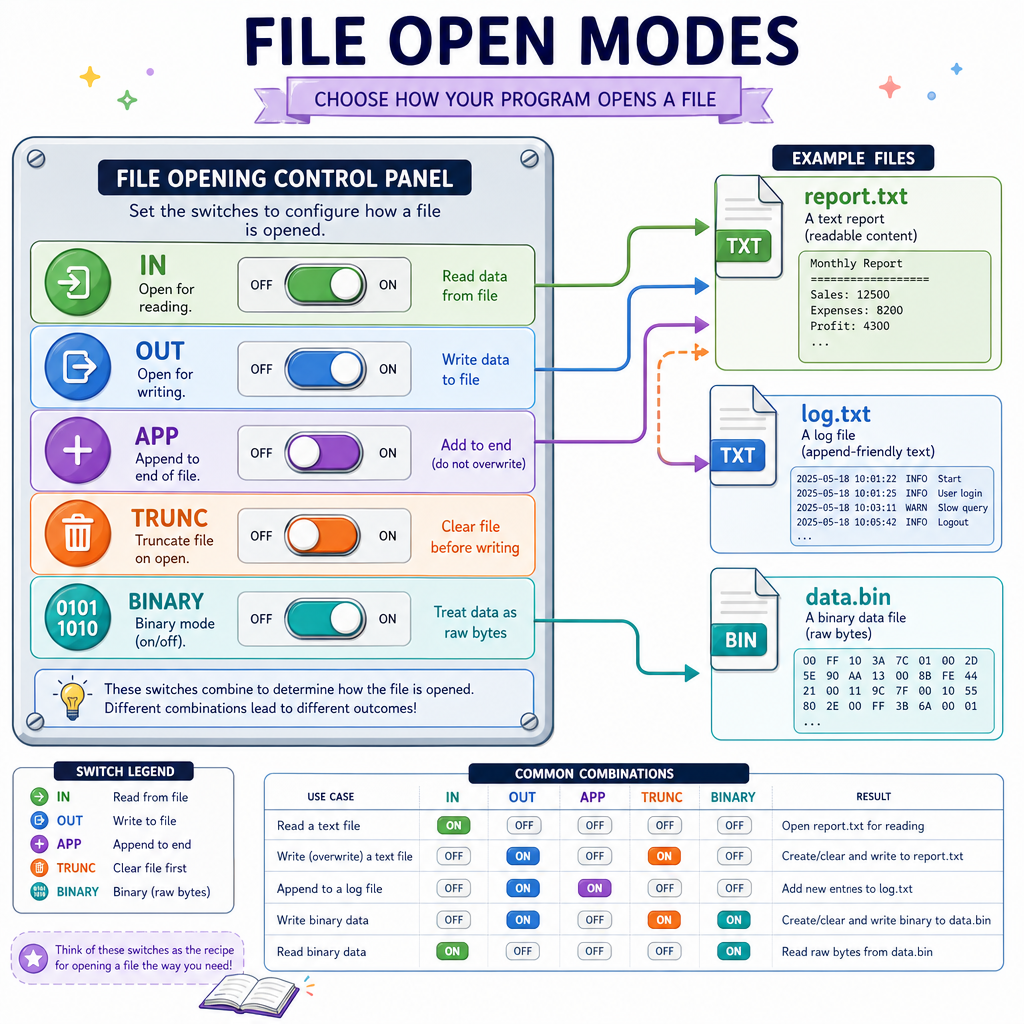
File streams can be opened with modes that describe your intent.
Common modes:
Mode Meaningstd::ios::out
Open for writing
std::ios::in
Open for reading
std::ios::app
Append writes to the end
std::ios::trunc
Clear existing file contents
std::ios::binary
Treat bytes as binary data
For most beginner and interview-style tasks, text files are enough: logs, CSVs, simple reports, configuration files.
Binary files matter when you need compact storage or exact byte-level formats, but text files are easier to inspect, debug, and share.
One practical rule: if a human should be able to open it in a text editor, start with text mode.
Cplusplus Comes Together
You now have the core C++ toolkit
This course started with syntax and compiled programs, then moved through objects, containers, algorithms, and finally persistence.
You can now build small but real C++ programs that follow this pipeline:
Input file -> parse records -> store in containers -> run algorithms -> write results
That pattern appears everywhere:
- Finance: read trades, compute exposure, write reports
- AI: load datasets, transform rows, save predictions
- Web/backend systems: process logs, generate summaries
- Computer science practice: test algorithms on saved inputs
A strong next step is to combine everything into one project: read a dataset from a file, model each row as an object, store the objects in a container, run an algorithm, and write a result file.
That is the bridge from learning C++ syntax to using C++ as a tool.