High-Level System Design
Read at your own pace. Code execution, quizzes, progress tracking, and the AI tutor are available in the interactive view with JavaScript enabled.
From Idea To Blueprint
Why this lesson matters
In Introduction to System Design and Architecture, you learned that requirements drive design and that architecture is about tradeoffs.
Now we move one level up: High-Level System Design, often called HLD.
Think of HLD like the city map before construction begins:
- What major buildings exist?
- How do roads connect them?
- Where are the bottlenecks?
- What happens when traffic grows?
For a Java/Spring Boot developer, HLD answers questions like: Where does the React app send requests? What backend components exist? Where is data stored? How do we scale safely?
We will stay at the big-picture level here. In the next lesson, Low-Level Design Principles, we will zoom into classes, interfaces, methods, and object responsibilities.

HLD Blueprint
What HLD captures
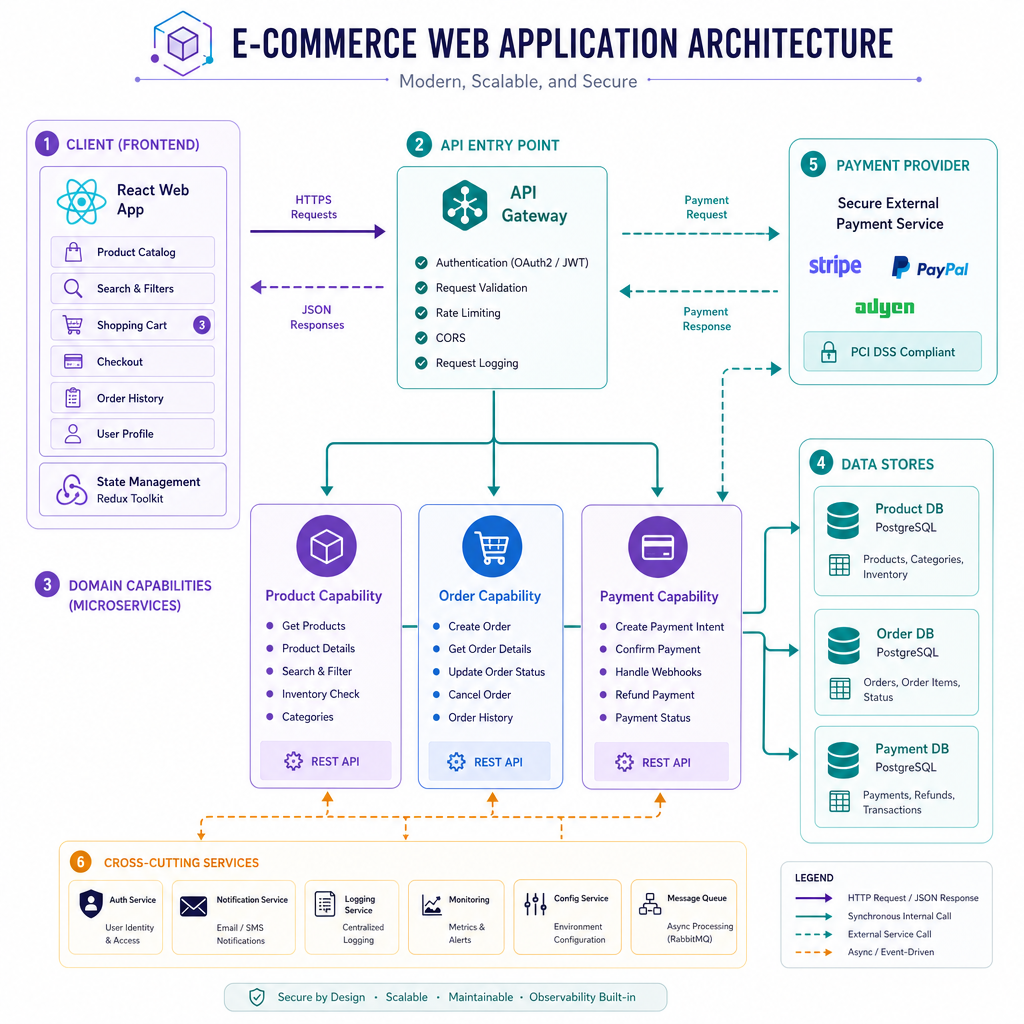
A high-level design describes the major components of a system and how they communicate.
It usually includes:
- Clients: browser, mobile app, partner system
- Entry point: load balancer, API gateway, web server
- Core services: business capabilities at a broad level
- Data stores: relational DB, document store, search index, cache
- External systems: payment provider, email service, identity provider
- Non-functional needs: scale, latency, availability, security, cost
A simple HLD diagram for an online store might look like this:
[React Web App]
       |
       v
[API Entry Point]
       |
       +--> [Product Capability] ---> [Product Data]
       |
       +--> [Order Capability] -----> [Order Data]
       |
       +--> [Payment Provider]
Notice what is not shown: Java classes, method names, controller annotations, or table columns. Those belong to later, more detailed design work.
What Belongs Here?
Which item most clearly belongs in a high-level system design document?
Estimate First
HLD starts with rough sizing
Before drawing boxes, ask: How big is this system?
You do not need perfect math. You need estimates good enough to choose an architecture.
Example questions:
- How many daily active users?
- How many actions per user per day?
- What is peak traffic compared to average traffic?
- How much data is written per month?
These estimates guide choices like caching, load balancing, database type, async processing, and horizontal scaling.
Here is a tiny Java estimator. It is intentionally simple because HLD sizing is usually approximate.
```java
public class Main {
    public static void main(String[] args) {
        int dailyActiveUsers = 100_000;
        int actionsPerUserPerDay = 20;
        double peakMultiplier = 5.0;
        long averageRequestBytes = 1_500;
        int daysPerMonth = 30;

        double averageRequestsPerSecond =
                (dailyActiveUsers * actionsPerUserPerDay) / 86_400.0;

        double peakRequestsPerSecond = averageRequestsPerSecond * peakMultiplier;

        double storageGbPerMonth =
                (dailyActiveUsers * actionsPerUserPerDay * averageRequestBytes * daysPerMonth)
                        / (1024.0 * 1024 * 1024);

        System.out.printf("Average RPS: %.2f%n", averageRequestsPerSecond);
        System.out.printf("Peak RPS: %.2f%n", peakRequestsPerSecond);
        System.out.printf("Estimated monthly data written: %.2f GB%n", storageGbPerMonth);
    }
}
```
All Details Now?
True or false: A high-level design should fully specify every Java class, every database column, and every deployment script before implementation begins.
Draw The Boundary
Components need clear responsibilities
A common HLD mistake is drawing too many boxes without explaining what each box owns.
At the high level, each component should have a clear job:
- Web App: user interaction
- API Entry Point: receives requests and routes them
- Auth Capability: verifies identity and permissions
- Catalog Capability: product browsing and search
- Order Capability: checkout and order lifecycle
The goal is not to decide every class. The goal is to prevent confusion like: Should order validation happen in the frontend, API gateway, or order component?
This Java example prints a high-level request path for placing an order.
```java
import java.util.LinkedHashMap;
import java.util.Map;

public class Main {
    public static void main(String[] args) {
        Map<String, String> components = new LinkedHashMap<>();
        components.put("React Web App", "Collects the user's checkout action");
        components.put("API Entry Point", "Accepts HTTPS requests and routes them");
        components.put("Auth Capability", "Checks user identity and permissions");
        components.put("Order Capability", "Validates cart and creates the order");
        components.put("Payment Provider", "Authorizes payment outside our system");
        components.put("Order Data Store", "Persists the final order state");

        System.out.println("High-level flow: Place Order");
        int step = 1;
        for (Map.Entry<String, String> entry : components.entrySet()) {
            System.out.printf("%d. %s -> %s%n", step++, entry.getKey(), entry.getValue());
        }
    }
}
```
Name The Entry
Fill in the blank:
The common high-level component that receives client requests and routes them toward backend capabilities is often called an ____ Gateway.
Data Flow First
Follow the request
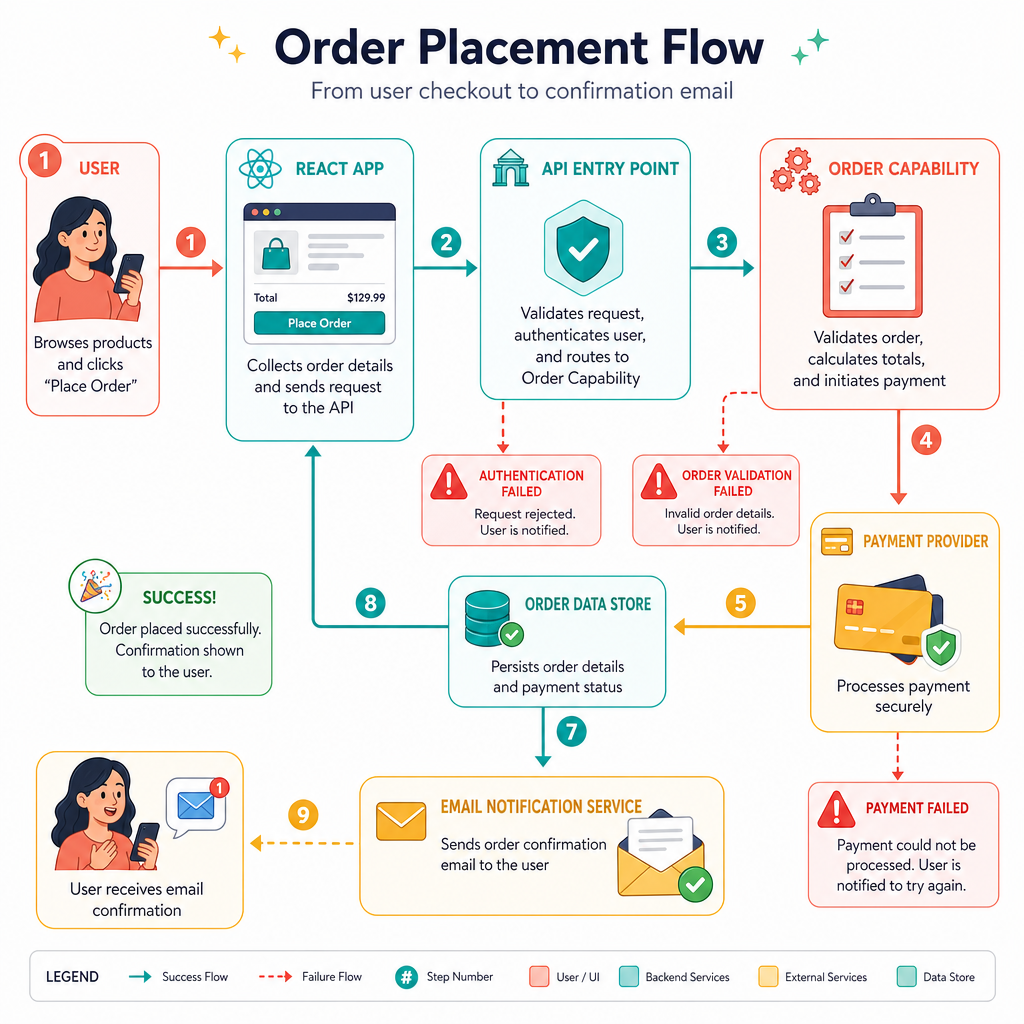
Once you know the major components, trace the most important flows.
For an e-commerce system, examples include:
- Browse products
- Add item to cart
- Place order
- Process payment
- Send confirmation email
For each flow, ask:
- Who starts the request?
- Which component receives it first?
- Which components are called next?
- Where is data read or written?
- What can fail?
- What response does the user receive?
At HLD level, you can use simple arrows and short notes. You do not need to design the exact database tables yet; that comes in Data Design and Database Management.
Choose Tradeoffs
HLD is tradeoff thinking
There is rarely one perfect design. A smaller team may prefer a simpler architecture. A high-traffic product may accept more operational complexity to gain scalability.
At HLD level, compare options using criteria such as:
- Latency: how fast users get responses
- Cost: infrastructure and engineering cost
- Operational complexity: how hard it is to run
- Scalability: how well it grows
- Availability: how well it handles failures
The simple Java program below scores architecture options. Lower score is better. The numbers are fictional, but the habit is real: make tradeoffs visible.
```java
import java.util.List;

public class Main {
    static class ArchitectureOption {
        String name;
        int latencyScore;
        int costScore;
        int complexityScore;

        ArchitectureOption(String name, int latencyScore, int costScore, int complexityScore) {
            this.name = name;
            this.latencyScore = latencyScore;
            this.costScore = costScore;
            this.complexityScore = complexityScore;
        }

        int weightedScore() {
            return latencyScore * 3 + costScore * 2 + complexityScore * 2;
        }
    }

    public static void main(String[] args) {
        List<ArchitectureOption> options = List.of(
                new ArchitectureOption("Single Spring Boot App", 3, 2, 1),
                new ArchitectureOption("Modular Backend With Cache", 2, 3, 3),
                new ArchitectureOption("Highly Distributed System", 1, 5, 5)
        );

        ArchitectureOption best = null;
        for (ArchitectureOption option : options) {
            System.out.printf("%s -> score %d%n", option.name, option.weightedScore());
            if (best == null || option.weightedScore() < best.weightedScore()) {
                best = option;
            }
        }

        System.out.println("Suggested starting point: " + best.name);
    }
}
```
Best HLD Step
You are designing a new food delivery platform. Before choosing databases or writing Spring Boot services, what is the best HLD next step?
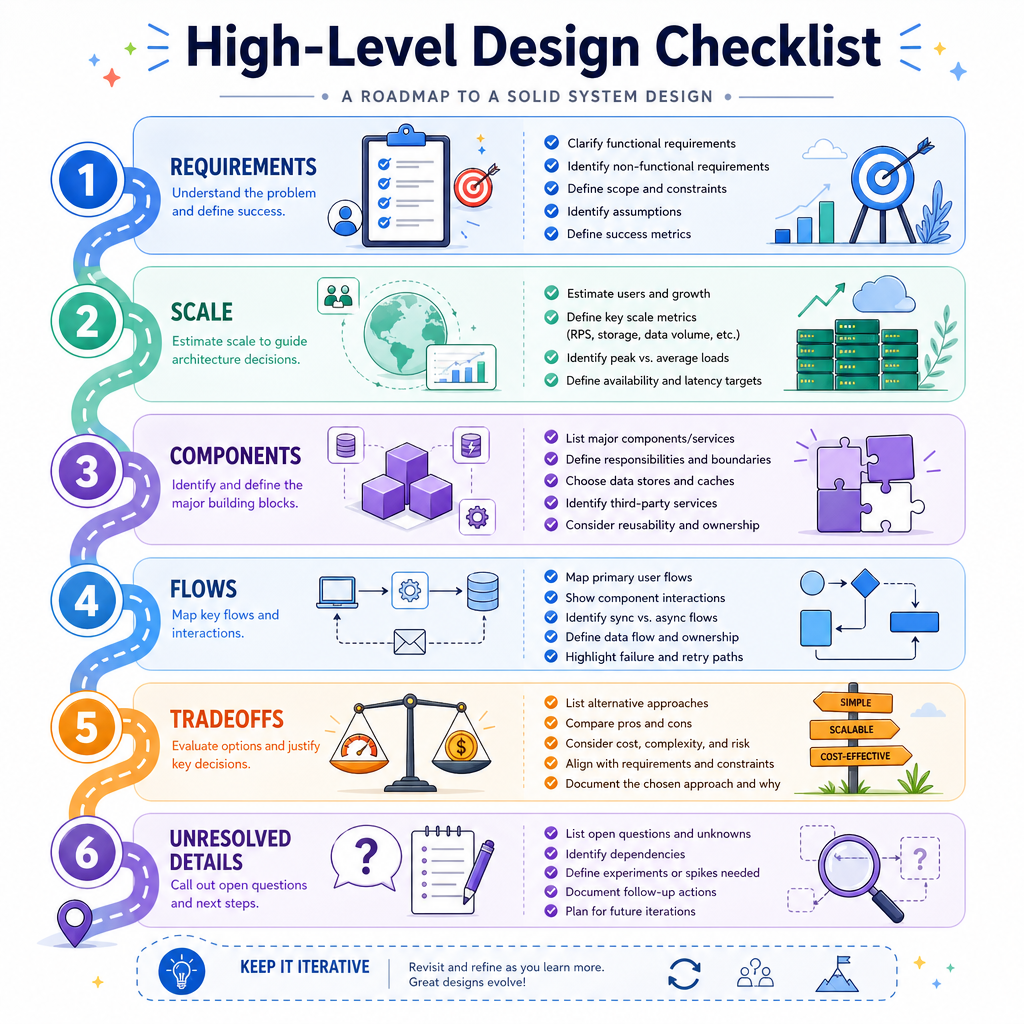
HLD Checklist
Your high-level design checklist
When someone asks you to design a system, use this order:
- Clarify requirements: what must the system do?
- Identify scale: users, requests, data volume, peak traffic
- Draw major components: clients, entry point, capabilities, storage, external systems
- Trace key flows: happy path and important failure paths
- Call out tradeoffs: cost, latency, complexity, availability
- Define what is intentionally unresolved: class design, exact schemas, deployment details
A good HLD should let another engineer say: I understand the shape of this system and why it is shaped this way.
Next, in Low-Level Design Principles, we will zoom into how to turn these boxes into clean Java classes, interfaces, and responsibilities.