Introduction to Live Algo Trading with R
Read at your own pace. Code execution, quizzes, progress tracking, and the AI tutor are available in the interactive view with JavaScript enabled.
Why This Matters
Welcome to live algo thinking
This is the first lesson in Live algo in R, so we are setting the mental model before writing the full system.
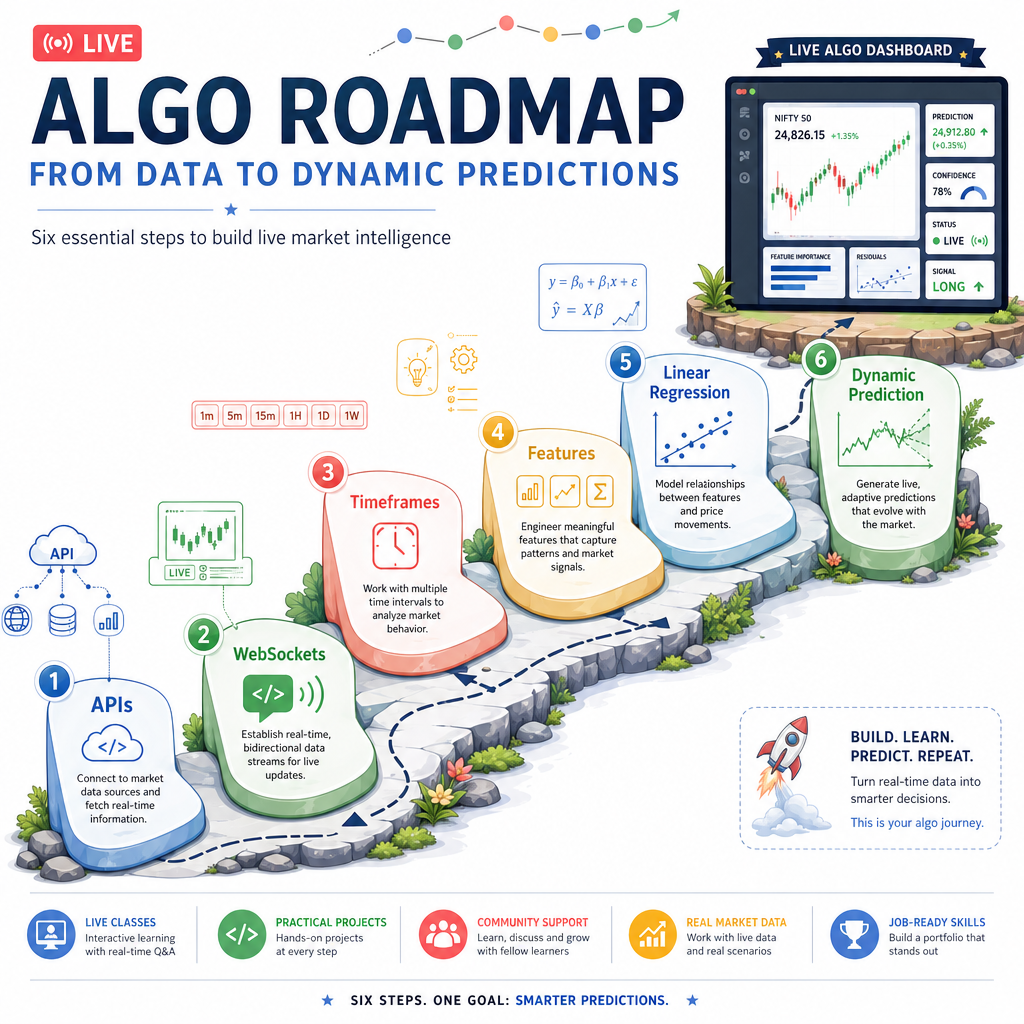
Your end goal is practical:
- receive market data in near real time
- organize seconds-level OHLC data
- calculate multiple timeframes side by side
- update features as new data arrives
- run a simple predictive model dynamically
The key shift is moving from static analysis to an event-driven pipeline. Instead of saying, "I have a completed data frame; now calculate indicators," a live system says, "A new row arrived; what state must update now?"
Batch Versus Live
The biggest conceptual difference
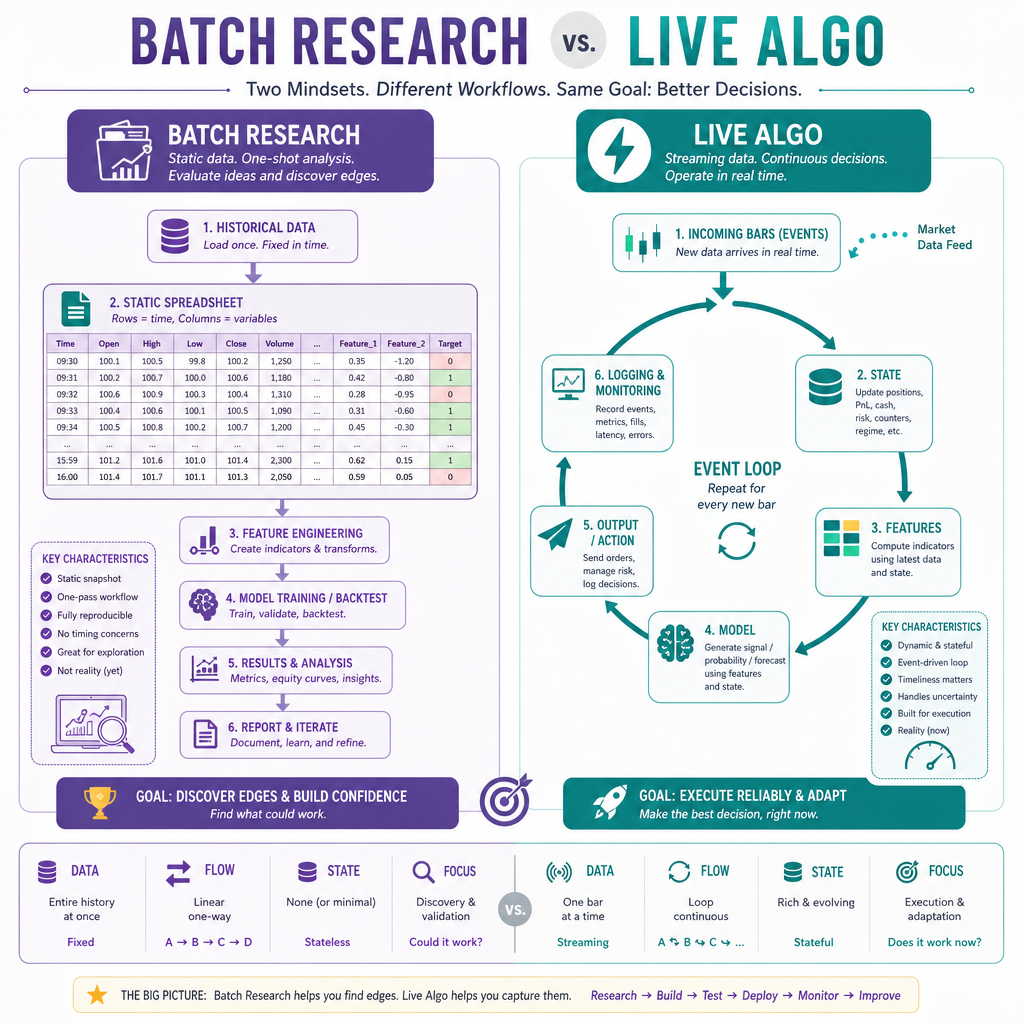
In normal backtesting or research, you often work like this:
historical data frame -> indicators -> model -> evaluation
In live trading, you work more like this:
new market event -> update stored state -> recompute needed features -> emit latest row
The data frame is no longer just a file you analyze. It becomes a living table whose newest row is continuously changing or extending.
For this first lesson, we will not connect to a real broker, API, or WebSocket yet. We are only defining the architecture you will use in the next lessons.
Pipeline Vocabulary
Terms we will use throughout the course
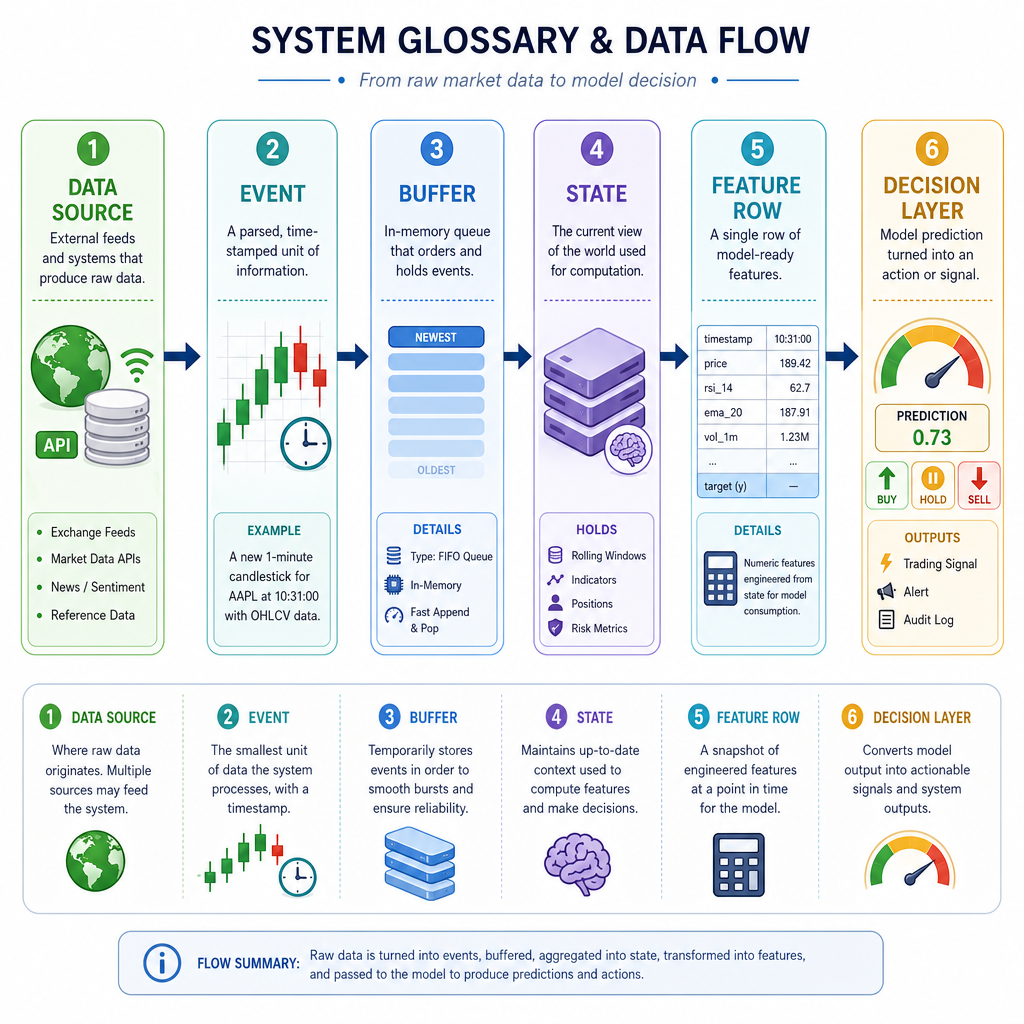
A live algo system is easier to build when each part has a clear job.
Component Job Data source API or WebSocket that provides market data Event One new piece of data, such as a tick or second bar Buffer Recent data kept in memory State The current values needed by calculations and models Feature row One aligned row containing price, indicators, model inputs, and predictions Decision layer Logic that may later convert predictions into actionsIn R, this may eventually be represented with data frames, data.table, xts, or tibble. The important idea is not the package yet — it is the flow of information.
A Tiny Event
What does one live row look like?
Before APIs and WebSockets, imagine the system receives one completed 1-second OHLC bar.
It needs a consistent structure. If every incoming event has predictable fields, the rest of the pipeline can consume it safely.
This Python snippet is not the final R implementation. It is a small executable model of the data contract we will later implement with R-friendly tools.
```python
from datetime import datetime, timezone

bar = {
    "symbol": "SPY",
    "timestamp": datetime(2026, 1, 15, 14, 30, 1, tzinfo=timezone.utc),
    "open": 481.10,
    "high": 481.22,
    "low": 481.05,
    "close": 481.18,
    "volume": 12500
}

print("Incoming event:")
for key, value in bar.items():
    print(f"{key}: {value}")
```
Core System Loop
The live loop mental model
Most live algo systems can be described with this loop:
- receive a new event
- validate it
- append it to a buffer
- update derived state
- produce the latest feature row
- optionally predict, log, alert, or trade
The details change by broker and package, but the shape stays stable.
The following toy example simulates incoming events without teaching API or WebSocket mechanics yet.
```python
from datetime import datetime, timedelta

buffer = []
start = datetime(2026, 1, 15, 14, 30, 0)

for i in range(3):
    event = {
        "symbol": "SPY",
        "timestamp": start + timedelta(seconds=i),
        "close": 481.00 + i * 0.03
    }

    buffer.append(event)
    latest = buffer[-1]

    print(f"Received {latest['symbol']} at {latest['timestamp'].time()} close={latest['close']:.2f}")
    print(f"Buffer now contains {len(buffer)} events")
```
Live System Goal
In a live algo pipeline, what is the main purpose of maintaining a buffer of recent market events?
One Row Concept
The row you ultimately want
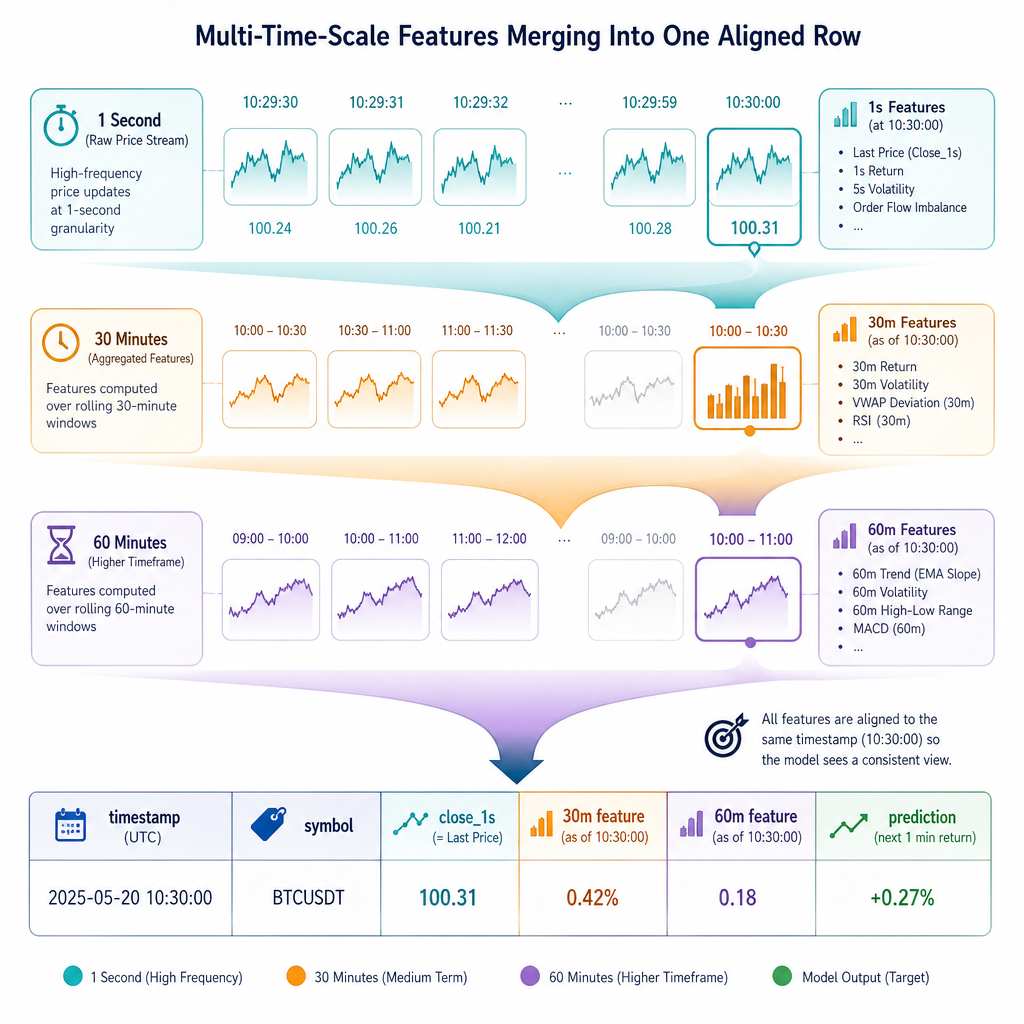
Your course goal mentions seeing a 30-minute 21-period moving average and a 60-minute 21-period moving average on the same line.
Conceptually, that final row may look like this:
timestamp symbol close_1s ma_30m_21 ma_60m_21 prediction 14:30:01 SPY 481.18 ... ... ...The hard part is not calculating a moving average once. The hard part is making sure every value is timestamp-aligned, fresh, and not accidentally using future data.
We will build toward this step by step in later lessons.
Live Means Stateful
True or false: In a live algo system, calculations often need stored state because each new event may depend on recent prior events.
Avoiding Future Leakage
The first live-trading safety rule
When building live features, each row must only use information available at or before that timestamp.
This matters because research code can accidentally use complete future data. Live code cannot.
Here is a tiny simulation that marks each feature row as using only prior closes. It does not calculate the future course indicators yet; it just demonstrates the rule.
```python
closes = [100.0, 101.0, 102.0, 103.0]

for index, close in enumerate(closes):
    available_history = closes[: index + 1]
    print(
        f"row={index}, close={close}, "
        f"available_history={available_history}"
    )

print("Rule: row i can use closes up to i, never i+1 or later.")
```
Name The Pattern
A live algo repeatedly receives a new market event, updates stored state, and emits the latest feature row. This is an event-driven ______.
Next Step
What you should remember
You now have the map for the rest of the section:
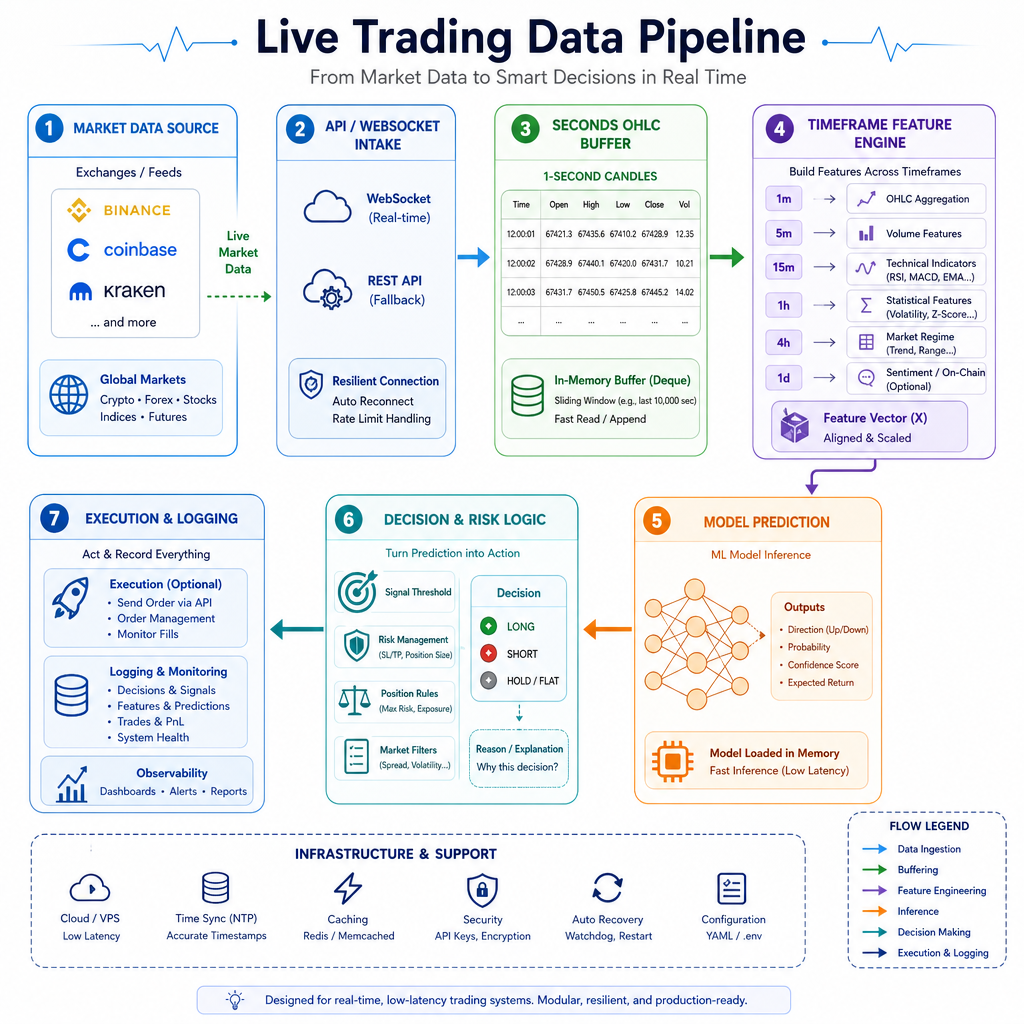
API/WebSocket data -> seconds-level events -> buffers/state -> timeframe features -> model prediction -> live output
The most important lesson is that live algo trading is not just "run my indicator faster." It is about creating a reliable pipeline where each incoming row updates the right downstream objects.
In the next lesson, Fetching OHLC Data from APIs, we will start at the first real input: requesting OHLC data from an external source.