AlgoDaily

Lesson 2: Reading Gmail API in C++

Read at your own pace. Code execution, quizzes, progress tracking, and the AI tutor are available in the interactive view with JavaScript enabled.

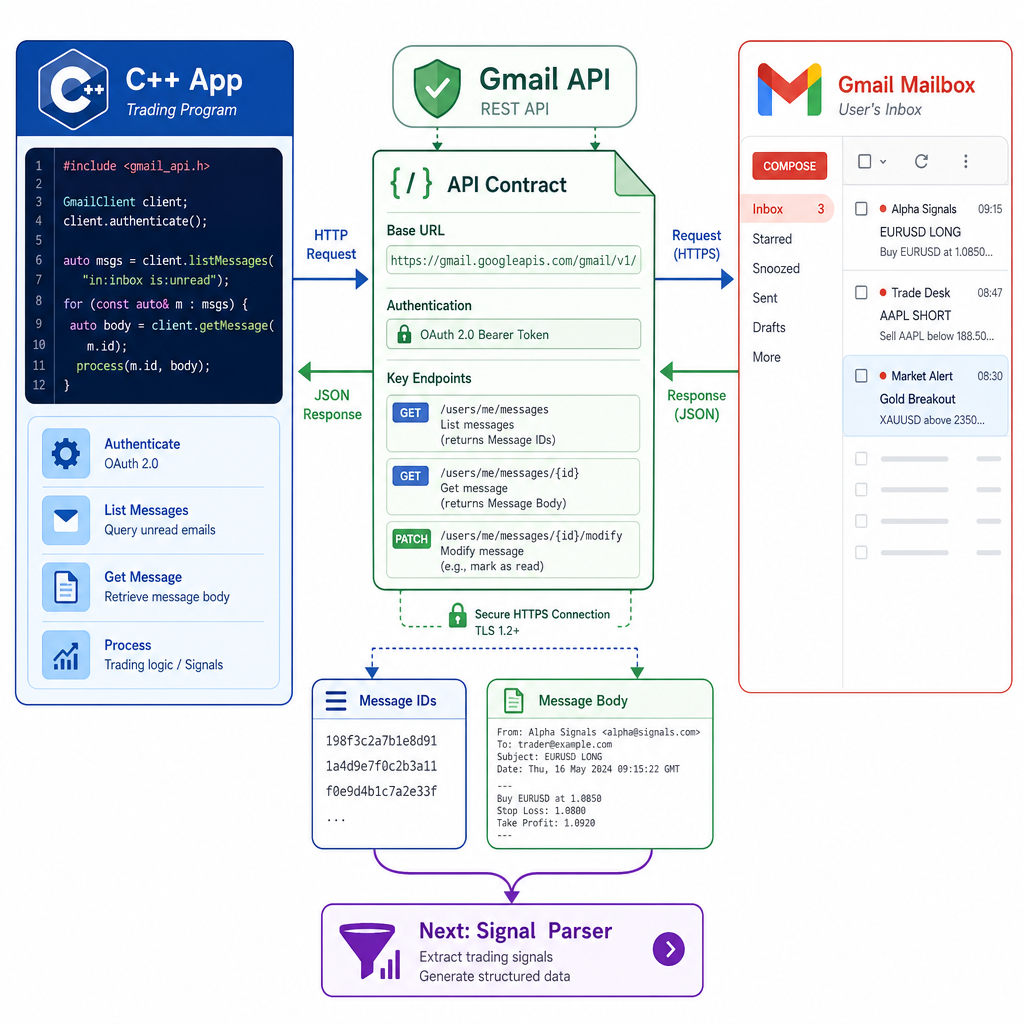
From Contract To Mailbox

Why this lesson matters

In Lesson 1: Introduction to API in C++, you learned the request/response contract: your program sends a request, the server returns a response, and status codes tell you what happened.

Now we apply that model to a real source of trading-related information: Gmail messages.

By the end of this lesson, you should understand how a C++ program can:

  • Ask Gmail for message IDs
  • Fetch one message by ID
  • Read useful fields from Gmail JSON
  • Decode message body text when Gmail sends it as base64url

We will not build the full buy/sell parser yet. That belongs to Lesson 3. Today is about getting reliable mailbox data into your C++ program.

From Contract To Mailbox

Gmail API Shape

Gmail is not just an inbox UI

When you open Gmail in a browser, you see folders, search, and message previews.

When C++ talks to Gmail through the API, it sees resources.

A simplified mental model:

User mailbox
  └── messages
        ├── message id: 18c1...
        ├── message id: 18c2...
        └── message id: 18c3...

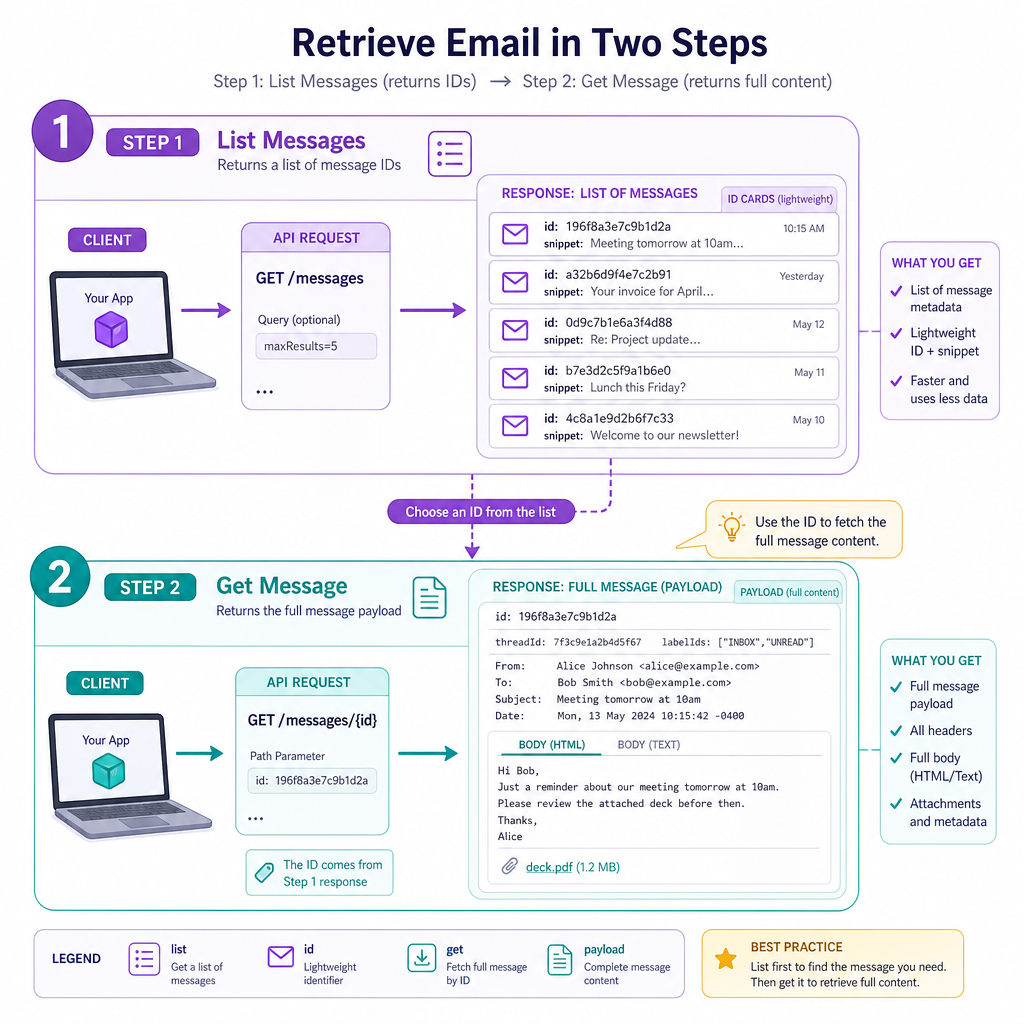
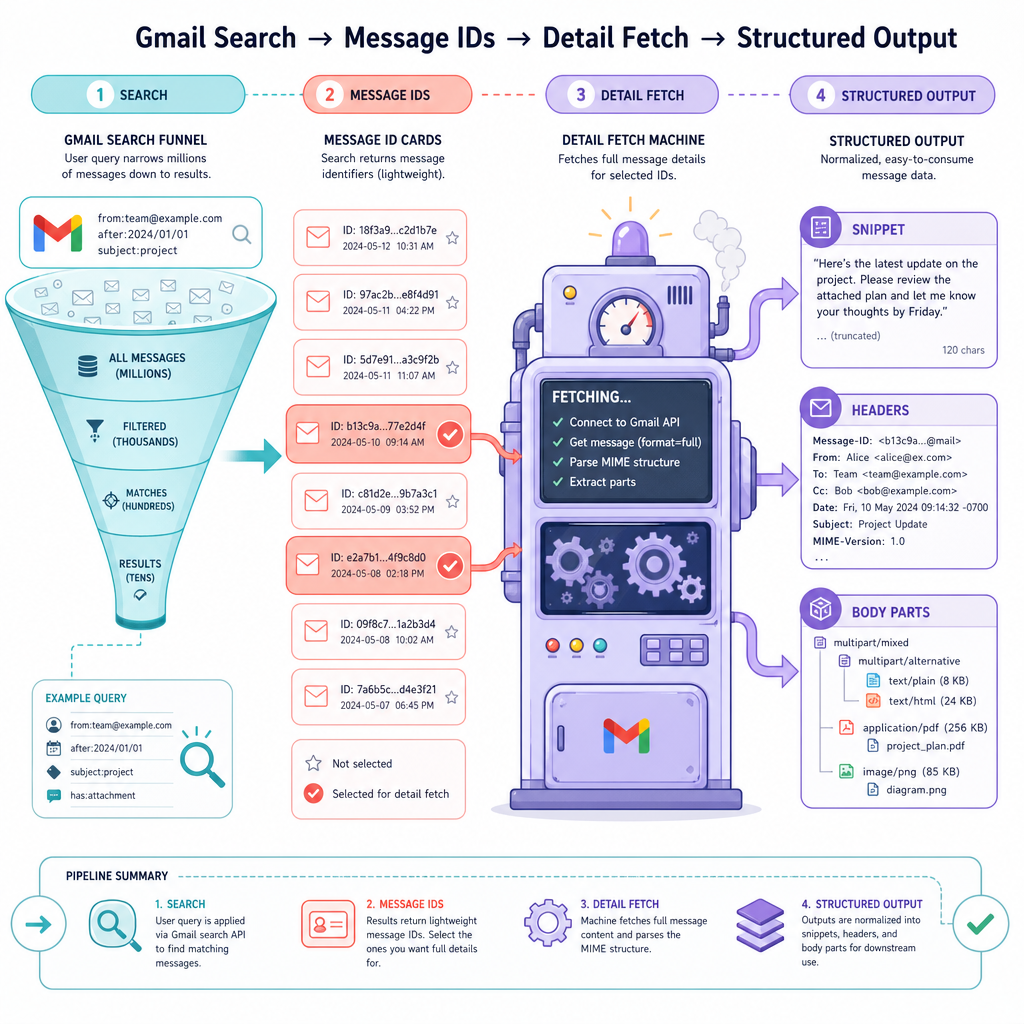
Your program usually does two API steps:

  1. List messages matching a query, such as recent emails from a signal provider
  2. Get one message by ID to inspect its snippet, headers, or body

That two-step pattern matters because Gmail often returns compact search results first, then detailed message data only when you ask for a specific message.

Gmail API Shape

OAuth Comes First

Gmail requires permission

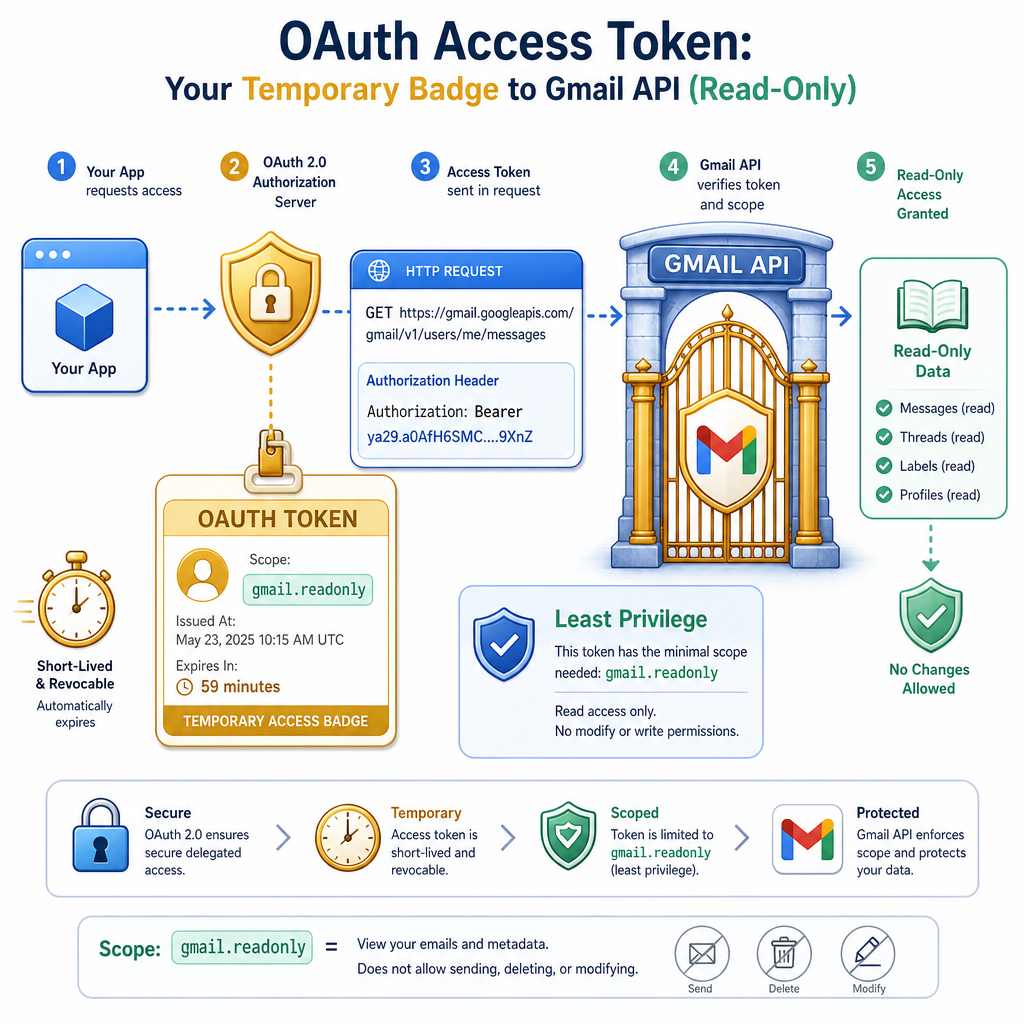
Gmail data is private, so your C++ program cannot simply call Gmail and read messages.

Before making Gmail API requests, your app needs an OAuth access token. Think of it as a temporary permission badge.

For this lesson, focus on how the token is used once you have it:

Authorization: Bearer <access_token>

For reading email metadata and bodies, a common scope is:

https://www.googleapis.com/auth/gmail.readonly

Important trading-system habit: use the least powerful scope that works. If your program only reads messages, do not request permission to send or delete mail.

OAuth Comes First

Build The Request

Log the request before sending it

Before wiring in a real HTTP client, it is useful to print the exact URL and headers your C++ code intends to send.

For Gmail message search, the endpoint shape is:

GET https://gmail.googleapis.com/gmail/v1/users/me/messages?q=<query>

The query can use Gmail search syntax, such as:

from:signals@example.com newer_than:1d

The C++ example below does not contact Google. It builds and logs the request shape so you can verify it before adding network transport.

```cpp
#include <cctype>
#include <iomanip>
#include <iostream>
#include <sstream>
#include <string>

std::string urlEncode(const std::string& value) {
    std::ostringstream escaped;
    escaped << std::hex << std::uppercase;

    for (unsigned char c : value) {
        if (std::isalnum(c) || c == '-' || c == '_' || c == '.' || c == '~') {
            escaped << c;
        } else if (c == ' ') {
            escaped << "%20";
        } else {
            escaped << '%' << std::setw(2) << std::setfill('0') << int(c);
        }
    }

    return escaped.str();
}

int main() {
    std::string token = "<ACCESS_TOKEN>";
    std::string query = "from:signals@example.com newer_than:1d";

    std::string url = "https://gmail.googleapis.com/gmail/v1/users/me/messages?q=" + urlEncode(query);

    std::cout << "GET " << url << "\n\n";
    std::cout << "Headers:\n";
    std::cout << "Authorization: Bearer " << token << "\n";
    std::cout << "Accept: application/json\n";

    return 0;
}
```

Authorization Header

A C++ program already has a valid OAuth access token and wants to call the Gmail API.

Which HTTP header is used to prove the request is authorized?

List Then Get

Do not expect everything at once

The Gmail API separates discovery from detail.

1. List messages
GET /gmail/v1/users/me/messages?q=...

This usually returns lightweight records:

{
  "messages": [
    { "id": "18c1a", "threadId": "t1" },
    { "id": "18c1b", "threadId": "t2" }
  ]
}
2. Get one message
GET /gmail/v1/users/me/messages/18c1a

That second call can return fields like snippet, payload, headers, and body parts.

For a trading workflow, this keeps your program efficient: search first, inspect only the messages that may matter.

List Then Get

Extract Message IDs

First useful data: message IDs

A real project should use a JSON library, but the structure is simple enough to demonstrate the idea with a tiny extractor.

The goal here is not to build a perfect JSON parser. The goal is to see the data path:

Gmail list response -> message IDs -> later get requests

The example below uses a mock Gmail-style response and prints the IDs your program would fetch next.

```cpp
#include <iostream>
#include <string>
#include <vector>

std::vector<std::string> extractIds(const std::string& json) {
    std::vector<std::string> ids;
    const char quote = char(34);
    std::string key = std::string(1, quote) + "id" + quote;

    std::size_t pos = 0;
    while ((pos = json.find(key, pos)) != std::string::npos) {
        std::size_t colon = json.find(':', pos);
        std::size_t firstQuote = json.find(quote, colon + 1);
        std::size_t secondQuote = json.find(quote, firstQuote + 1);

        if (colon == std::string::npos || firstQuote == std::string::npos || secondQuote == std::string::npos) {
            break;
        }

        ids.push_back(json.substr(firstQuote + 1, secondQuote - firstQuote - 1));
        pos = secondQuote + 1;
    }

    return ids;
}

int main() {
    const char q = char(34);
    std::string json = std::string("{ ") +
        q + "messages" + q + ": [" +
        "{ " + q + "id" + q + ": " + q + "18c1a" + q + ", " + q + "threadId" + q + ": " + q + "t1" + q + " }," +
        "{ " + q + "id" + q + ": " + q + "18c1b" + q + ", " + q + "threadId" + q + ": " + q + "t2" + q + " }" +
        "] }";

    std::vector<std::string> ids = extractIds(json);

    std::cout << "Message IDs to fetch:\n";
    for (const auto& id : ids) {
        std::cout << "- " << id << "\n";
    }

    return 0;
}
```

List Response Detail

True or false:

messages.list always returns the complete email body, so a separate message-get request is not needed.

Decode Body Text

Gmail body data may be encoded

When you fetch a message, Gmail may place body content under a field like:

payload.parts[].body.data

That data value is often base64url encoded. Base64url is similar to base64, but it uses URL-safe characters and may omit padding.

Your C++ program must decode it before it can treat the message body as normal text.

In Lesson 3, that decoded text becomes the input for buy/sell signal parsing.

```cpp
#include <iostream>
#include <string>
#include <vector>

std::string toBase64(std::string s) {
    for (char& c : s) {
        if (c == '-') c = '+';
        if (c == '_') c = '/';
    }
    while (s.size() % 4 != 0) {
        s += '=';
    }
    return s;
}

std::string base64Decode(const std::string& input) {
    const std::string alphabet = "ABCDEFGHIJKLMNOPQRSTUVWXYZabcdefghijklmnopqrstuvwxyz0123456789+/";
    std::vector<int> table(256, -1);

    for (int i = 0; i < static_cast<int>(alphabet.size()); ++i) {
        table[static_cast<unsigned char>(alphabet[i])] = i;
    }

    std::string output;
    int value = 0;
    int bits = -8;

    for (unsigned char c : input) {
        if (c == '=') break;
        if (table[c] == -1) continue;

        value = (value << 6) + table[c];
        bits += 6;

        if (bits >= 0) {
            output.push_back(char((value >> bits) & 0xFF));
            bits -= 8;
        }
    }

    return output;
}

int main() {
    std::string gmailData = "VHJhZGluZyBhbGVydDogQlVZIE1TRlQ";

    std::string normalBase64 = toBase64(gmailData);
    std::string decoded = base64Decode(normalBase64);

    std::cout << "Encoded Gmail body: " << gmailData << "\n";
    std::cout << "Decoded text: " << decoded << "\n";

    return 0;
}
```

Bearer Prefix

Complete the authorization header value:

Authorization: ____ <access_token>
Open interactive view →