Text-based Adventure Game
Read at your own pace. Code execution, quizzes, progress tracking, and the AI tutor are available in the interactive view with JavaScript enabled.
Final Project Quest
Your capstone project
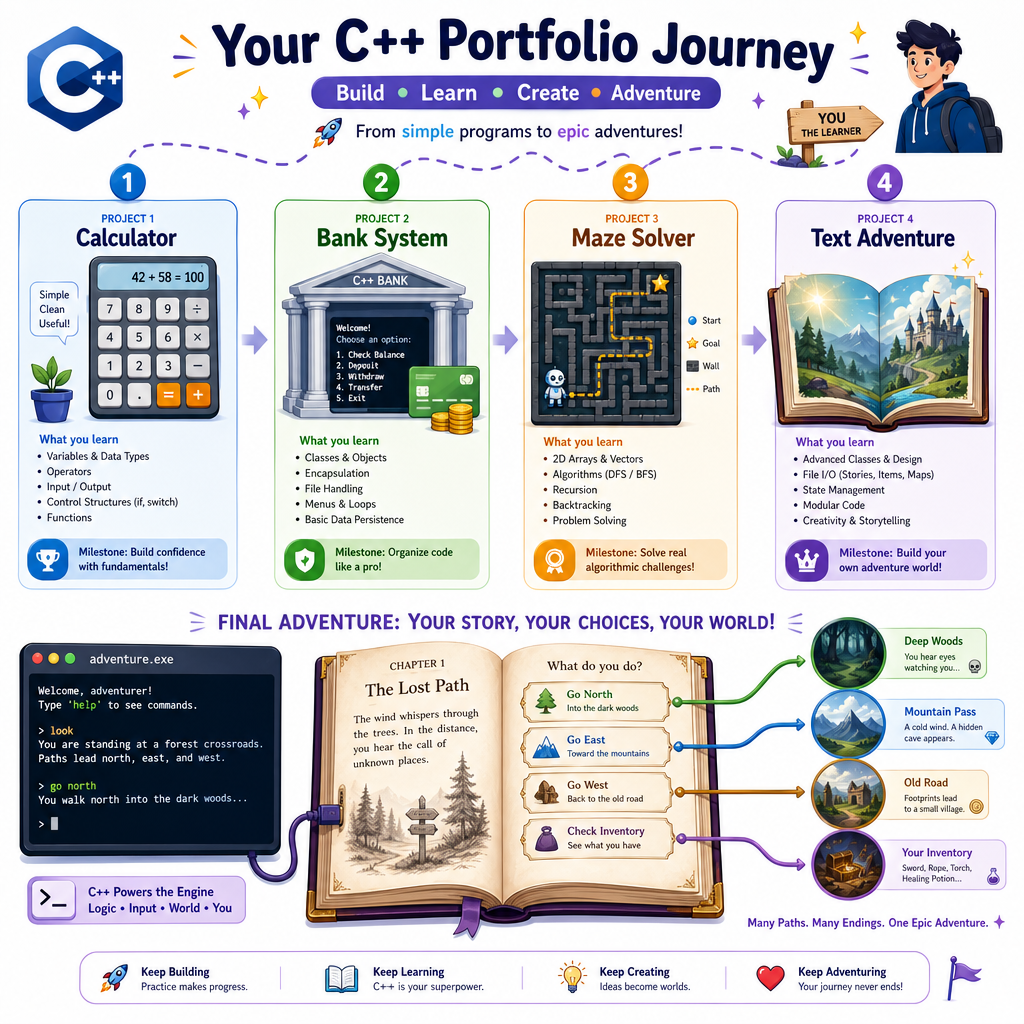
Now that you've built a Console-based Calculator, a small Banking System, and a Maze Game, you're ready for a project that combines all three mindsets:
- Calculator: clean command handling and input loops
- Banking System: domain modeling with classes and state
- Maze Game: movement, maps, and win conditions
A text-based adventure game is portfolio-friendly because it shows you can design an interactive system, model a small world, and make code feel like an experience.
By the end, you'll have the shape of a playable C++ game you can expand with rooms, items, puzzles, enemies, saving, or even a JS/web frontend later.
Adventure Game Model
Think in nouns first
A text adventure is not just a pile of if statements. It is a small world model.
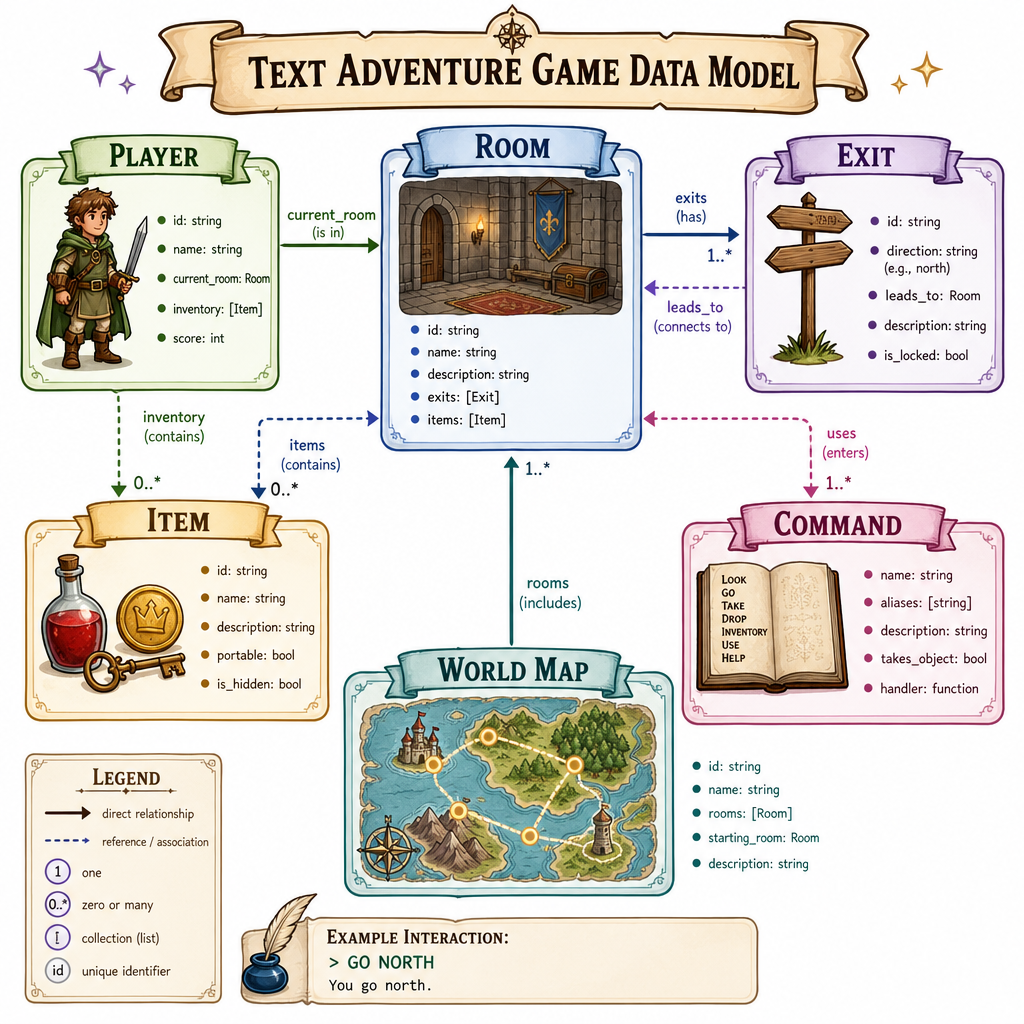
Useful nouns:
- Room: where the player currently is
- Exit: a direction leading to another room
- Item: something the player can pick up or use
- Player: current room, inventory, progress flags
-
Command: parsed user intent, like
go northortake key
A clean mental model looks like this:
Player
  currentRoom: "forest"
  inventory: ["key"]
        |
        v
World: map<string, Room>
  "forest" -> exits: east -> "cave"
  "cave"   -> exits: west -> "forest", north -> "tower"
This builds directly on the Maze Game, but instead of moving through a grid of characters, you move through a graph of named locations.
Rooms As Graphs
A world is a graph
In the Maze Game, movement depended on row and column coordinates. In a text adventure, movement usually depends on named exits.
That makes map<string, Room> a natural fit:
- room id:
"forest" - room description: text shown to the player
- exits: direction names mapped to destination room ids
This structure is easy to grow. Add a new room, connect it with exits, and your game world expands without rewriting the whole loop.
```cpp
#include <iostream>
#include <map>
#include <string>
#include <vector>
using namespace std;

struct Room {
    string description;
    map<string, string> exits;
};

int main() {
    map<string, Room> world;

    world["forest"] = {
        "You stand in a quiet forest. A cave lies to the east.",
        {{"east", "cave"}}
    };

    world["cave"] = {
        "The cave is cool and dark. Paths lead west and north.",
        {{"west", "forest"}, {"north", "tower"}}
    };

    world["tower"] = {
        "You reach an old tower. Sunlight pours through broken stones.",
        {{"south", "cave"}}
    };

    string currentRoom = "forest";
    vector<string> scriptedMoves = {"east", "north"};

    cout << "Starting adventure...\n\n";

    for (const string& move : scriptedMoves) {
        cout << world[currentRoom].description << "\n";
        cout << "Command: go " << move << "\n";

        if (world[currentRoom].exits.count(move)) {
            currentRoom = world[currentRoom].exits[move];
            cout << "You travel " << move << ".\n\n";
        } else {
            cout << "You cannot go that way.\n\n";
        }
    }

    cout << world[currentRoom].description << "\n";
    cout << "Final room: " << currentRoom << "\n";

    return 0;
}
```
Choose The Structure
You want to represent a text adventure world where each room has named exits like north, east, or trapdoor, and each exit leads to another room.
Which structure best supports that design?
Parse Player Commands
Turn text into intent
Players type text. Your game needs intent.
A simple command parser can split input into:
- verb: what the player wants to do
- noun: the target, direction, or item
Examples:
look        -> verb: look, noun: ""
go north    -> verb: go,   noun: north
take key    -> verb: take, noun: key
use lantern -> verb: use,  noun: lantern
Keep the parser small at first. The goal is not natural-language AI; it is predictable commands that make your game easy to play and easy to debug.
```cpp
#include <algorithm>
#include <iostream>
#include <sstream>
#include <string>
#include <vector>
using namespace std;

struct Command {
    string verb;
    string noun;
};

string toLower(string text) {
    transform(text.begin(), text.end(), text.begin(), [](unsigned char c) {
        return static_cast<char>(tolower(c));
    });
    return text;
}

Command parseCommand(string input) {
    input = toLower(input);
    stringstream ss(input);

    Command command;
    ss >> command.verb;
    ss >> command.noun;

    return command;
}

int main() {
    vector<string> inputs = {"LOOK", "go North", "take key", "use lantern"};

    for (const string& input : inputs) {
        Command command = parseCommand(input);
        cout << "Input: " << input << "\n";
        cout << "Verb: " << command.verb << ", Noun: " << command.noun << "\n\n";
    }

    return 0;
}
```
Parser Responsibility
True or false:
A command parser should usually decide whether the player has won the game, update room exits, and print every room description.
Items And Conditions
Add meaningful state
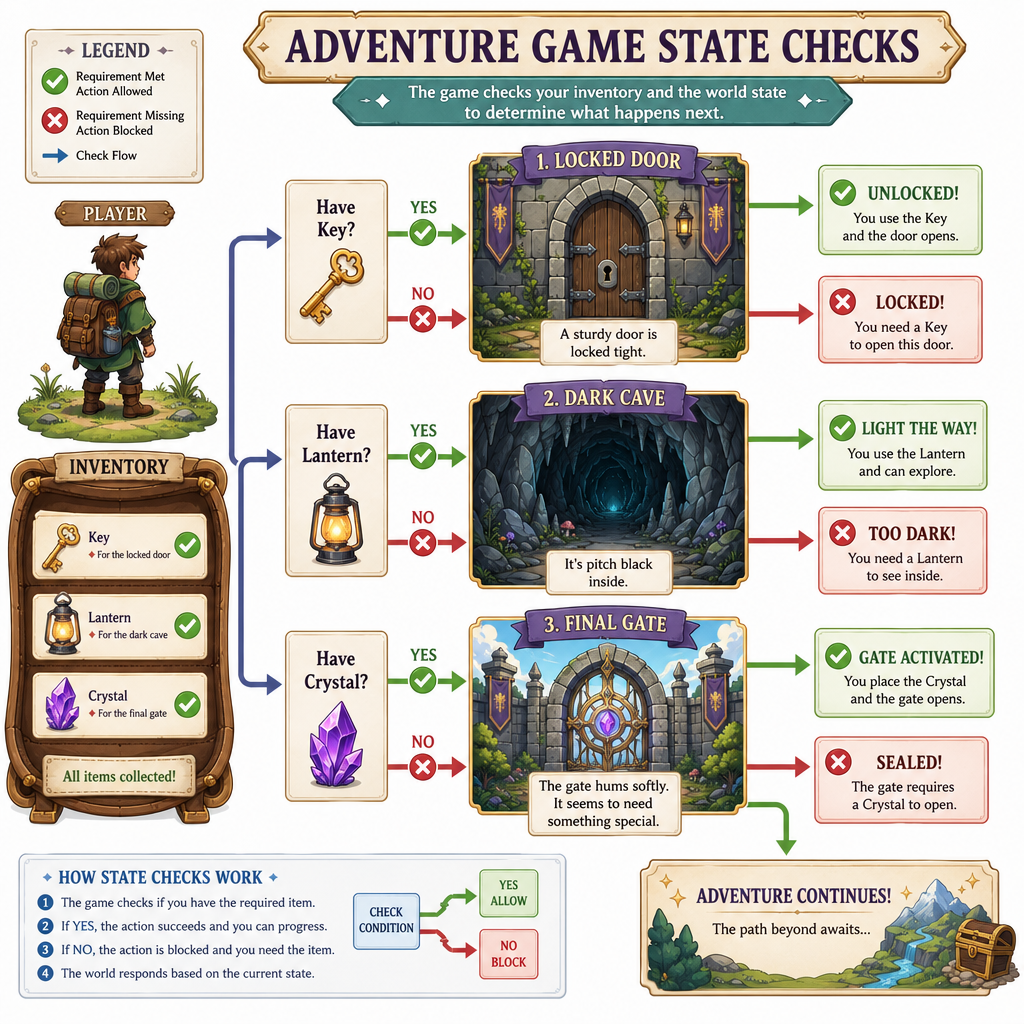
Rooms and movement create the skeleton. Items and conditions create the game.
For example:
Locked tower door
  requires: key

Dark cave
  requires: lantern to inspect safely

Final gate
  requires: crystal + correct room
A simple inventory can be a vector<string> or set<string>. For a portfolio project, set<string> is often convenient because you can quickly ask, "Does the player have this item?"
Common state checks:
- Can the player move through this exit?
- Is the item still in the room?
- Has the player already solved this puzzle?
- Does this command trigger the ending?
This is where the project starts feeling less like a maze and more like an adventure.
Recall A Command
In many text adventure games, the command that reprints the current room description is ____.
Type the lowercase command only.
Mini Adventure Build
A small complete version
Here is a compact playable-style adventure using the same pieces:
- rooms as a graph
- parsed commands
- inventory
- a locked exit
- a win condition
The scriptedCommands vector simulates a player session so the example runs automatically. In your portfolio version, replace that loop source with getline(cin, input) to make it interactive.
```cpp
#include <algorithm>
#include <iostream>
#include <map>
#include <set>
#include <sstream>
#include <string>
#include <vector>
using namespace std;

struct Room {
    string description;
    map<string, string> exits;
    vector<string> items;
};

struct Command {
    string verb;
    string noun;
};

string toLower(string text) {
    transform(text.begin(), text.end(), text.begin(), [](unsigned char c) {
        return static_cast<char>(tolower(c));
    });
    return text;
}

Command parseCommand(string input) {
    input = toLower(input);
    stringstream ss(input);
    Command command;
    ss >> command.verb;
    ss >> command.noun;
    return command;
}

bool removeItem(vector<string>& items, const string& item) {
    auto it = find(items.begin(), items.end(), item);
    if (it == items.end()) return false;
    items.erase(it);
    return true;
}

void describeRoom(const string& roomId, const map<string, Room>& world) {
    const Room& room = world.at(roomId);
    cout << "\n" << room.description << "\n";

    if (!room.items.empty()) {
        cout << "You see: ";
        for (const string& item : room.items) cout << item << " ";
        cout << "\n";
    }

    cout << "Exits: ";
    for (const auto& exit : room.exits) cout << exit.first << " ";
    cout << "\n";
}

int main() {
    map<string, Room> world;

    world["camp"] = {
        "You are at a quiet camp beside a dying fire.",
        {{"east", "forest"}},
        {"key"}
    };

    world["forest"] = {
        "Tall trees surround a locked stone gate to the north.",
        {{"west", "camp"}, {"north", "gate"}},
        {}
    };

    world["gate"] = {
        "The gate opens into a bright courtyard. You found the lost shrine!",
        {{"south", "forest"}},
        {}
    };

    string currentRoom = "camp";
    set<string> inventory;
    bool won = false;

    vector<string> scriptedCommands = {
        "look",
        "take key",
        "go east",
        "go north"
    };

    cout << "Text Adventure: The Lost Shrine\n";

    for (const string& input : scriptedCommands) {
        cout << "\n> " << input << "\n";
        Command command = parseCommand(input);

        if (command.verb == "look") {
            describeRoom(currentRoom, world);
        } else if (command.verb == "take") {
            if (command.noun.empty()) {
                cout << "Take what?\n";
            } else if (removeItem(world[currentRoom].items, command.noun)) {
                inventory.insert(command.noun);
                cout << "You take the " << command.noun << ".\n";
            } else {
                cout << "There is no " << command.noun << " here.\n";
            }
        } else if (command.verb == "go") {
            if (!world[currentRoom].exits.count(command.noun)) {
                cout << "You cannot go that way.\n";
            } else if (currentRoom == "forest" && command.noun == "north" && !inventory.count("key")) {
                cout << "The gate is locked. You need a key.\n";
            } else {
                currentRoom = world[currentRoom].exits[command.noun];
                cout << "You go " << command.noun << ".\n";
                describeRoom(currentRoom, world);

                if (currentRoom == "gate") {
                    won = true;
                    cout << "Victory!\n";
                    break;
                }
            }
        } else {
            cout << "Unknown command. Try look, go, or take.\n";
        }
    }

    cout << "\nGame over. Won? " << (won ? "yes" : "no") << "\n";
    return 0;
}
```
Portfolio Polish
Make it worth showing
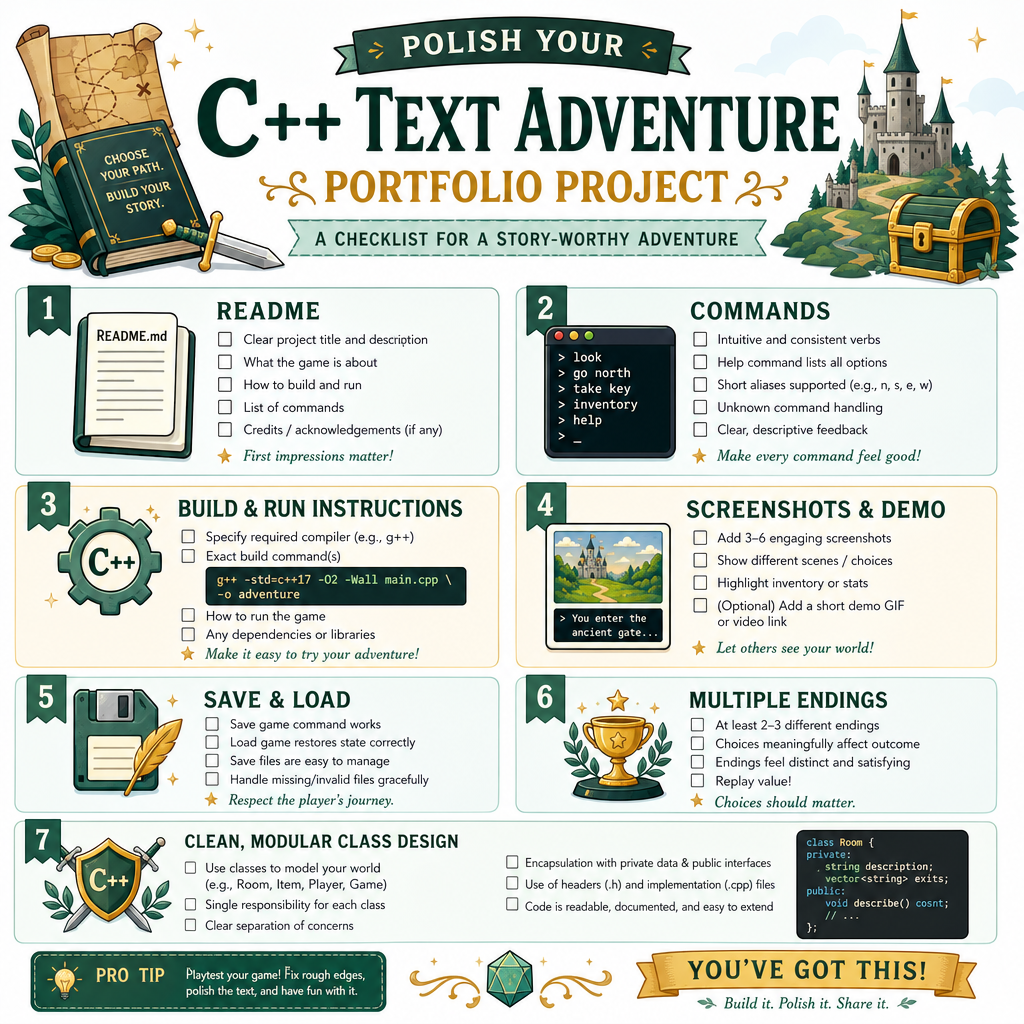
To turn this from an exercise into a portfolio project, focus on visible quality.
Add a strong README.md:
- project summary
- supported commands
- build/run instructions
- design notes: rooms, parser, inventory, win condition
- screenshots or terminal transcript
Good extension ideas:
- save/load game state using file persistence from Banking System
- random encounters or puzzles
- multiple endings
- command aliases like
n,north, andgo north - a cleaner class design:
Game,Player,Room,CommandParser - unit-style tests for parsing and movement rules
Avoid overbuilding before the core loop is fun. A small polished game beats a huge unfinished one.
Course Wrap Up
You now have a project toolkit
Across this course, you practiced a practical progression:
- Introduction to C++ Projects: think in small shippable slices
- Console-based Calculator: build reliable input loops and operation logic
- Banking System: model a domain with classes and persistent state
- Maze Game: manage movement, rules, and game loops
- Text-based Adventure Game: combine structure, state, commands, and storytelling
That is a strong foundation for backend-style C++ portfolio work: model data, process commands, enforce rules, and present a clean user experience.
Your next step is to choose one project from this course and improve it until it feels complete enough to show. Rename variables clearly, split files thoughtfully, write a README, and make the build/run path effortless.
Ship the smallest impressive version — then iterate.