Lesson 3: Adding Persistence to the Key-Value Store
Read at your own pace. Code execution, quizzes, progress tracking, and the AI tutor are available in the interactive view with JavaScript enabled.
Why Persistence Matters
From memory to durability
In Lesson 2: Building a Basic Key-Value Store, we built a tiny in-memory store with operations like set, get, and delete.
That store was fast, but fragile:
process exits -> Python dict disappears -> data is gone
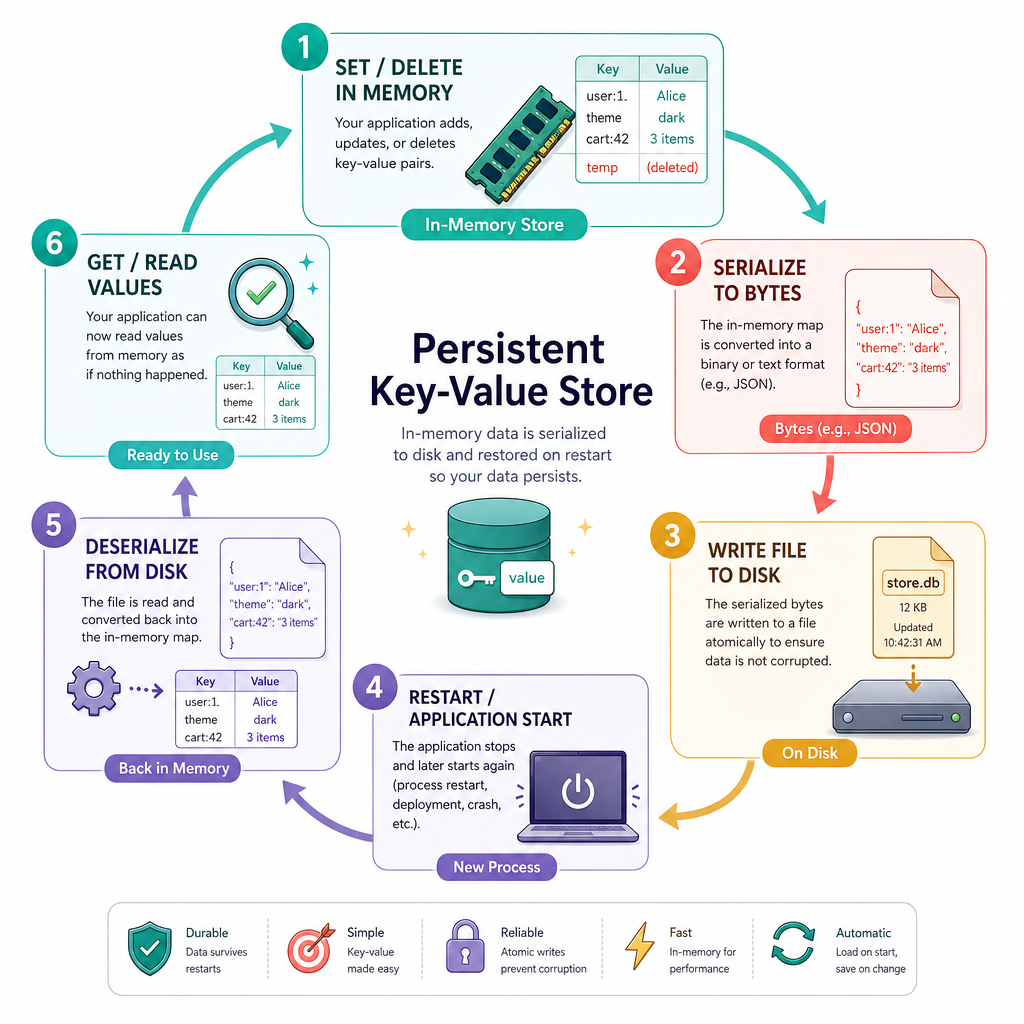
In this lesson, we add a crucial datastore property: persistence.
Persistence means our key-value store can survive process restarts by saving data somewhere outside process memory, usually on disk.
By the end, our store will support this workflow:
Session 1: set("ticker", "AAPL") -> save to file
Session 2: restart program -> load file -> get("ticker") == "AAPL"
This is the first big step from “data structure” toward “real datastore.”

Memory Versus Disk
The durability boundary
A running Python program owns memory only while it is alive. Files live beyond the lifetime of the program.
That gives us a simple persistence model:
          volatile                         durable
+-------------------------+        +---------------------+
| Python process memory   |        | File on disk         |
| {"user:1": "Ada"}      |  --->  | store.json           |
+-------------------------+        +---------------------+
There are two key operations:
- Serialization: convert the in-memory data structure into bytes/text that can be written to disk.
- Deserialization: read bytes/text from disk and rebuild the in-memory data structure.
For our first persistent store, we will use JSON because it is easy to inspect, language-independent, and built into Python.
Real systems use many formats: JSON, binary encodings, pages, write-ahead logs, SSTables, and more. But the core idea is the same: encode state, store it durably, and recover it later.

Persistence Check
A key-value store keeps all data only in a Python dictionary. The program exits and starts again.
What happens to the data?
Serialize A Snapshot
First persistence strategy: snapshots
A snapshot saves the current full state of the store to a file.
For our tiny store, this is straightforward:
- Keep data in a dictionary.
- Convert the dictionary to JSON.
- Write JSON to a file.
- Later, read JSON and rebuild the dictionary.
This is simple and surprisingly useful for small datasets, prototypes, config stores, and local tools.
The tradeoff: saving the whole dictionary every time can become expensive as data grows. For now, correctness and clarity matter more than scale.
```python
import json
import tempfile
from pathlib import Path

# In-memory key-value data, like the store from Lesson 2
data = {
    "user:1": "Ada",
    "ticker:AAPL": "192.53",
    "feature:dark_mode": "enabled"
}

with tempfile.TemporaryDirectory() as tmp:
    path = Path(tmp) / "store.json"

    # Serialization: dict -> JSON file
    with path.open("w", encoding="utf-8") as f:
        json.dump(data, f)

    print("Saved file contents:")
    print(path.read_text(encoding="utf-8"))

    # Deserialization: JSON file -> dict
    with path.open("r", encoding="utf-8") as f:
        restored = json.load(f)

    print("Restored value:", restored["ticker:AAPL"])
```
Name The Step
Converting an in-memory dictionary into a storable representation such as JSON is called ________.
Load On Startup
Rehydrating the store
A persistent datastore needs a startup routine:
if file exists:
    load existing data
else:
    start empty
This process is often called rehydration: rebuilding the in-memory structure from durable storage.
Below, we simulate two separate sessions. The first session writes data. The second creates a new store instance from the same file and reads the data back.
```python
import json
import tempfile
from pathlib import Path

class PersistentKVStore:
    def __init__(self, path):
        self.path = Path(path)
        self.data = self._load()

    def _load(self):
        if not self.path.exists():
            return {}
        with self.path.open("r", encoding="utf-8") as f:
            return json.load(f)

    def save(self):
        with self.path.open("w", encoding="utf-8") as f:
            json.dump(self.data, f)

    def set(self, key, value):
        self.data[key] = value

    def get(self, key):
        return self.data.get(key)

    def delete(self, key):
        self.data.pop(key, None)

with tempfile.TemporaryDirectory() as tmp:
    db_file = Path(tmp) / "kv.json"

    # Session 1
    store1 = PersistentKVStore(db_file)
    store1.set("portfolio:cash", "10000")
    store1.set("portfolio:risk", "medium")
    store1.save()
    print("Session 1 saved cash:", store1.get("portfolio:cash"))

    # Session 2: new object, same file
    store2 = PersistentKVStore(db_file)
    print("Session 2 loaded cash:", store2.get("portfolio:cash"))
    print("Session 2 loaded risk:", store2.get("portfolio:risk"))
```
Restart Survival
True or false: If a key-value store writes a JSON snapshot to disk and later loads that JSON file on startup, values can survive across program restarts.
Safer File Writes
Avoid half-written files
A direct write can fail midway:
open store.json -> write first half -> crash -> corrupted JSON
A common safer pattern is:
- Write the new snapshot to a temporary file.
- Flush it.
- Atomically replace the old file with the new file.
On most operating systems, os.replace(temp, target) swaps the file path atomically: readers should see either the old complete file or the new complete file, not a half-written version.
This is still a simplified approach, but it teaches a core datastore habit: think carefully about failure during writes.
```python
import json
import os
import tempfile
from pathlib import Path

class SaferPersistentKVStore:
    def __init__(self, path):
        self.path = Path(path)
        self.data = self._load()

    def _load(self):
        if not self.path.exists():
            return {}
        with self.path.open("r", encoding="utf-8") as f:
            return json.load(f)

    def set(self, key, value):
        self.data[key] = value

    def get(self, key):
        return self.data.get(key)

    def save(self):
        temp_path = self.path.with_suffix(self.path.suffix + ".tmp")
        with temp_path.open("w", encoding="utf-8") as f:
            json.dump(self.data, f)
            f.flush()
            os.fsync(f.fileno())
        os.replace(temp_path, self.path)

with tempfile.TemporaryDirectory() as tmp:
    path = Path(tmp) / "store.json"

    store = SaferPersistentKVStore(path)
    store.set("model:version", "v1")
    store.set("model:accuracy", "0.91")
    store.save()

    restarted = SaferPersistentKVStore(path)
    print("Loaded model version:", restarted.get("model:version"))
    print("Raw durable file:", path.read_text(encoding="utf-8"))
```
When To Save
Persistence policy
Adding save() creates an important design decision: when should the store write to disk?
Three common policies:
Policy Behavior Pros Cons Manual save User callssave() explicitly
Simple, fast writes
Easy to forget; recent changes can be lost
Save on every mutation
set and delete immediately persist
Stronger durability
Slower writes
Periodic save
Save every N seconds/operations
Good throughput
Some recent changes may be lost
For this lesson, manual save and save-on-mutation are enough. The key is understanding the tradeoff:
more frequent saves -> better durability, lower write throughput
less frequent saves  -> faster writes, more possible data loss
This durability/performance tension shows up everywhere: finance ledgers, AI feature stores, user sessions, caches, and production databases.

Persistence Wrap Up
What we added
Our Lesson 2 store had a clean API but forgot everything after shutdown. Now it can persist state across sessions.
You learned how to:
- Serialize dictionary state into JSON.
- Write that state to a file.
- Load the file on startup.
- Rehydrate the in-memory key-value store.
- Think about safer writes using temporary files and atomic replacement.
- Choose a basic persistence policy.
The store is still simple: it scans by exact key and stores one main dictionary. In Lesson 4: Implementing Indexing and Searching, we will build on this foundation and make lookup patterns more powerful without losing sight of the storage boundary we introduced here.