Networking Troubleshooting Cheat Sheet
Read at your own pace. Code execution, quizzes, progress tracking, and the AI tutor are available in the interactive view with JavaScript enabled.
Why Troubleshooting Matters
Now that we've covered Linux Bash Commands Cheat Sheet, Introduction to Network Topologies, and What is DNS and How Does It Work?, we’re ready for the practical DevOps skill that ties them together: network troubleshooting.
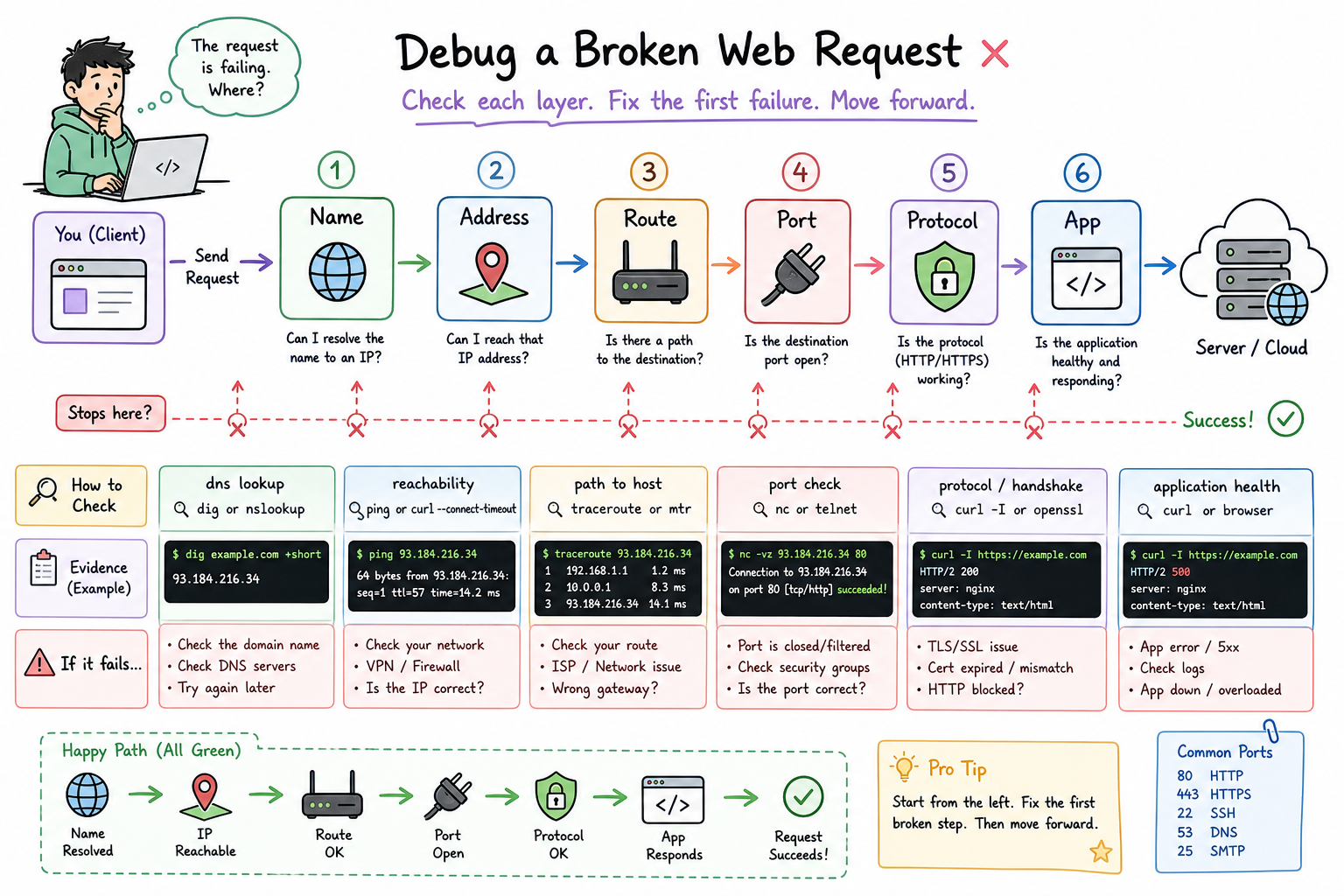
When an app says connection refused, timeout, 502, or could not resolve host, your job is not to panic-scroll logs. Your job is to narrow the failure zone.
Think like this:
Name -> Address -> Route -> Port -> Protocol -> App
Each step answers one question:
- Name: Can we resolve the hostname?
- Address: Do we have the expected IP?
- Route: Can packets reach the network path?
- Port: Is something listening?
- Protocol: Is HTTP/TLS behaving?
- App: Is the service returning useful responses?
This lesson is a cheat sheet you can use during local debugging, CI/CD failures, cloud incidents, and interview scenarios.
CONTINUE WITH ALGODAILY PREMIUM
Keep going with the complete tutorial.
Unlock the remaining explanations and exercises, alongside the full learning library.
Explore Premium →