Project: Real-time Chat Application
Read at your own pace. Code execution, quizzes, progress tracking, and the AI tutor are available in the interactive view with JavaScript enabled.
Why Chat Now
From APIs to real-time systems
Now that we've covered Project Setup and Version Control, Design Patterns in Java, Building a RESTful Web Service, and Database Integration with Hibernate, we're ready to combine them into a small but realistic project: a real-time chat application.
This project matters because chat forces you to think beyond request/response:
- Users connect and stay connected
- Messages move instantly between clients
- Rooms need membership rules
- Message history should survive restarts
- The code must stay layered enough to evolve
In this lesson, we will design the project and walk through core Java source code patterns you can directly adapt into a Spring Boot/WebSocket application.

System Shape
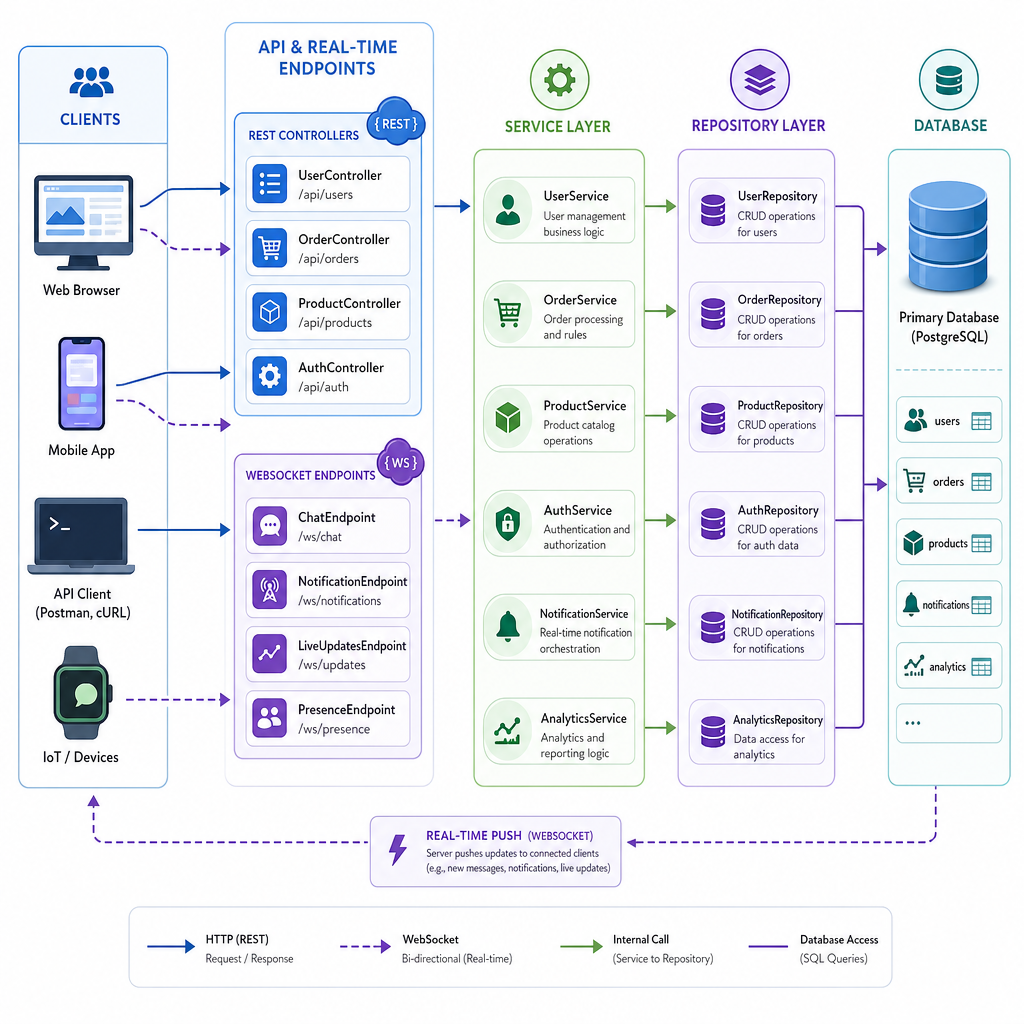
The chat application architecture
A real-time chat app usually combines two communication styles:
- REST for slower, discrete operations: login, room list, message history
- WebSocket for live events: join room, send message, receive message
We will keep the same layered mindset from the REST and Hibernate lessons:
Browser / Mobile Client
        |
        | REST: users, rooms, history
        | WebSocket: live messages
        v
Controller / WebSocket Endpoint
        |
        v
Service Layer
        |
        v
Repository Layer
        |
        v
Database
The important design rule: the WebSocket endpoint should not contain business logic. It should translate network messages into service calls, just like a REST controller does.
Domain First
Start with the core model
Before thinking about Spring annotations or database tables, model the chat behavior in plain Java.
This gives us a clean center for the project:
- A
ChatMessagerepresents one message - A
ChatRoomowns message history - A
ChatServicecoordinates joining rooms and sending messages
This is the same idea as the Service Layer Demo from the REST lesson: controllers and endpoints should call services, not become services.
```java
import java.time.Instant;
import java.util.*;

public class ChatDomainDemo {
    record ChatMessage(String roomId, String sender, String text, Instant sentAt) {}

    static class ChatRoom {
        private final String id;
        private final List<ChatMessage> history = new ArrayList<>();
        private final Set<String> members = new LinkedHashSet<>();

        ChatRoom(String id) {
            this.id = id;
        }

        void join(String username) {
            members.add(username);
            System.out.println(username + " joined room " + id);
        }

        ChatMessage send(String sender, String text) {
            if (!members.contains(sender)) {
                throw new IllegalStateException(sender + " is not in room " + id);
            }
            ChatMessage message = new ChatMessage(id, sender, text, Instant.now());
            history.add(message);
            return message;
        }

        List<ChatMessage> history() {
            return List.copyOf(history);
        }
    }

    static class ChatService {
        private final Map<String, ChatRoom> rooms = new HashMap<>();

        ChatRoom room(String roomId) {
            return rooms.computeIfAbsent(roomId, ChatRoom::new);
        }

        ChatMessage sendMessage(String roomId, String sender, String text) {
            return room(roomId).send(sender, text);
        }
    }

    public static void main(String[] args) {
        ChatService service = new ChatService();
        ChatRoom javaRoom = service.room("java");

        javaRoom.join("Asha");
        javaRoom.join("Milo");

        ChatMessage msg = service.sendMessage("java", "Asha", "Hello from the Java room!");
        System.out.println("Broadcast: [" + msg.roomId() + "] " + msg.sender() + ": " + msg.text());
        System.out.println("History size: " + javaRoom.history().size());
    }
}
```
Endpoint Responsibility
In the chat application, what should the WebSocket endpoint primarily be responsible for?
Message Flow
What happens when a user sends a message?
A live chat message has a short but important lifecycle:
- Client sends a WebSocket frame
- Endpoint parses the frame into a command
- Service validates the room and sender
- Repository stores the message if persistence is enabled
- Broadcaster delivers the message to connected room members
send("java", "Asha", "Hi")
        |
        v
WebSocket Endpoint
        |
        v
ChatService ----> MessageRepository
        |
        v
Room Broadcaster
        |
        v
Connected Clients
This is where the Observer Pattern from the design patterns lesson becomes practical: connected clients are subscribers to room events.
```java
import java.time.Instant;

public class WebSocketRoutingDemo {
    record SendMessageCommand(String roomId, String sender, String text) {}
    record ChatMessage(String roomId, String sender, String text, Instant sentAt) {}

    interface ChatGateway {
        ChatMessage handle(SendMessageCommand command);
    }

    static class ChatService implements ChatGateway {
        @Override
        public ChatMessage handle(SendMessageCommand command) {
            if (command.text().isBlank()) {
                throw new IllegalArgumentException("Message text cannot be blank");
            }
            return new ChatMessage(command.roomId(), command.sender(), command.text(), Instant.now());
        }
    }

    static class ChatWebSocketEndpoint {
        private final ChatGateway gateway;

        ChatWebSocketEndpoint(ChatGateway gateway) {
            this.gateway = gateway;
        }

        void onTextFrame(String frame) {
            // Simple demo protocol: roomId|sender|text
            String[] parts = frame.split("\\|", 3);
            SendMessageCommand command = new SendMessageCommand(parts[0], parts[1], parts[2]);
            ChatMessage saved = gateway.handle(command);
            System.out.println("Outgoing event -> " + saved.roomId() + ": " + saved.sender() + " says " + saved.text());
        }
    }

    public static void main(String[] args) {
        ChatWebSocketEndpoint endpoint = new ChatWebSocketEndpoint(new ChatService());
        endpoint.onTextFrame("java|Asha|WebSockets feel fast!");
    }
}
```
REST Or WebSocket
True or false: In this project, REST is a good fit for retrieving older message history, while WebSocket is a good fit for delivering new messages in real time.
Persistence Boundary
Where Hibernate fits
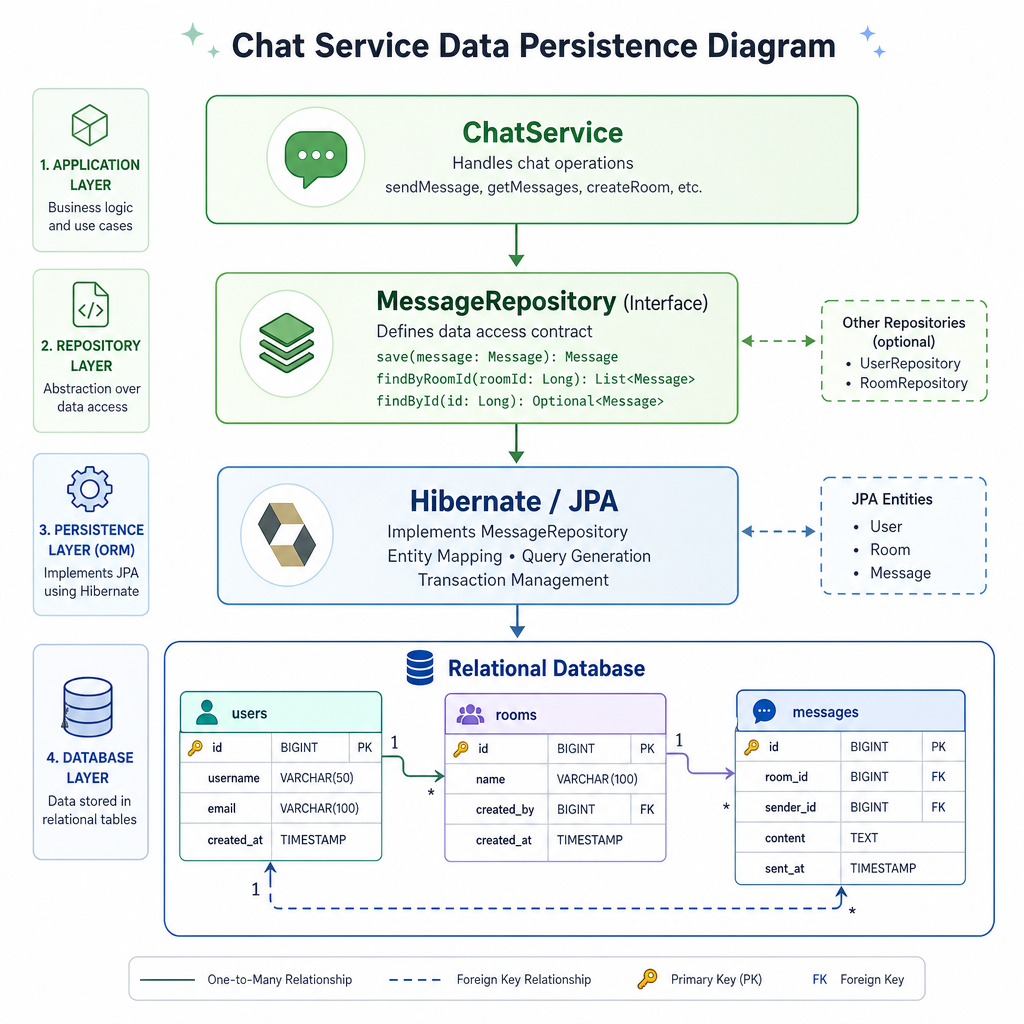
From Database Integration with Hibernate, you already know the entity/repository/transaction boundary. In the chat project, we apply that boundary without letting persistence leak into the WebSocket layer.
A typical persistence slice looks like this:
ChatService
   |
   v
MessageRepository interface
   |
   v
Hibernate/JPA implementation
   |
   v
messages table
Recommended entities:
-
UserEntity: application user profile -
ChatRoomEntity: room metadata -
MessageEntity: sender, room, text, timestamp
The service should talk to a repository abstraction such as MessageRepository. That keeps your real-time delivery logic independent from the storage technology.
Broadcast Safely
Broadcasting to connected clients
When multiple users are connected, the broadcaster becomes a shared component. That means we need to be careful with collections.
For a small chat room demo, CopyOnWriteArrayList is a good teaching tool because it lets us iterate safely while clients may connect or disconnect.
In a production Spring application, the actual WebSocket session management may be handled by framework classes, but the design idea remains the same: room event in, client notifications out.
```java
import java.util.*;
import java.util.concurrent.*;
import java.util.function.Consumer;

public class ConcurrentBroadcasterDemo {
    static class RoomBroadcaster {
        private final Map<String, CopyOnWriteArrayList<Consumer<String>>> subscribers = new ConcurrentHashMap<>();

        void subscribe(String roomId, Consumer<String> listener) {
            subscribers.computeIfAbsent(roomId, id -> new CopyOnWriteArrayList<>()).add(listener);
        }

        void broadcast(String roomId, String message) {
            for (Consumer<String> listener : subscribers.getOrDefault(roomId, new CopyOnWriteArrayList<>())) {
                listener.accept(message);
            }
        }
    }

    public static void main(String[] args) throws Exception {
        RoomBroadcaster broadcaster = new RoomBroadcaster();
        ExecutorService pool = Executors.newFixedThreadPool(2);

        broadcaster.subscribe("java", msg -> System.out.println("Asha received: " + msg));
        broadcaster.subscribe("java", msg -> System.out.println("Milo received: " + msg));

        pool.submit(() -> broadcaster.broadcast("java", "Welcome to the Java room"));
        pool.submit(() -> broadcaster.broadcast("java", "Observer pattern in action"));

        pool.shutdown();
        pool.awaitTermination(2, TimeUnit.SECONDS);
        System.out.println("Broadcast complete");
    }
}
```
Repository Blank
Complete the design rule: the WebSocket endpoint should delegate business behavior to the ______ layer.
Source Layout
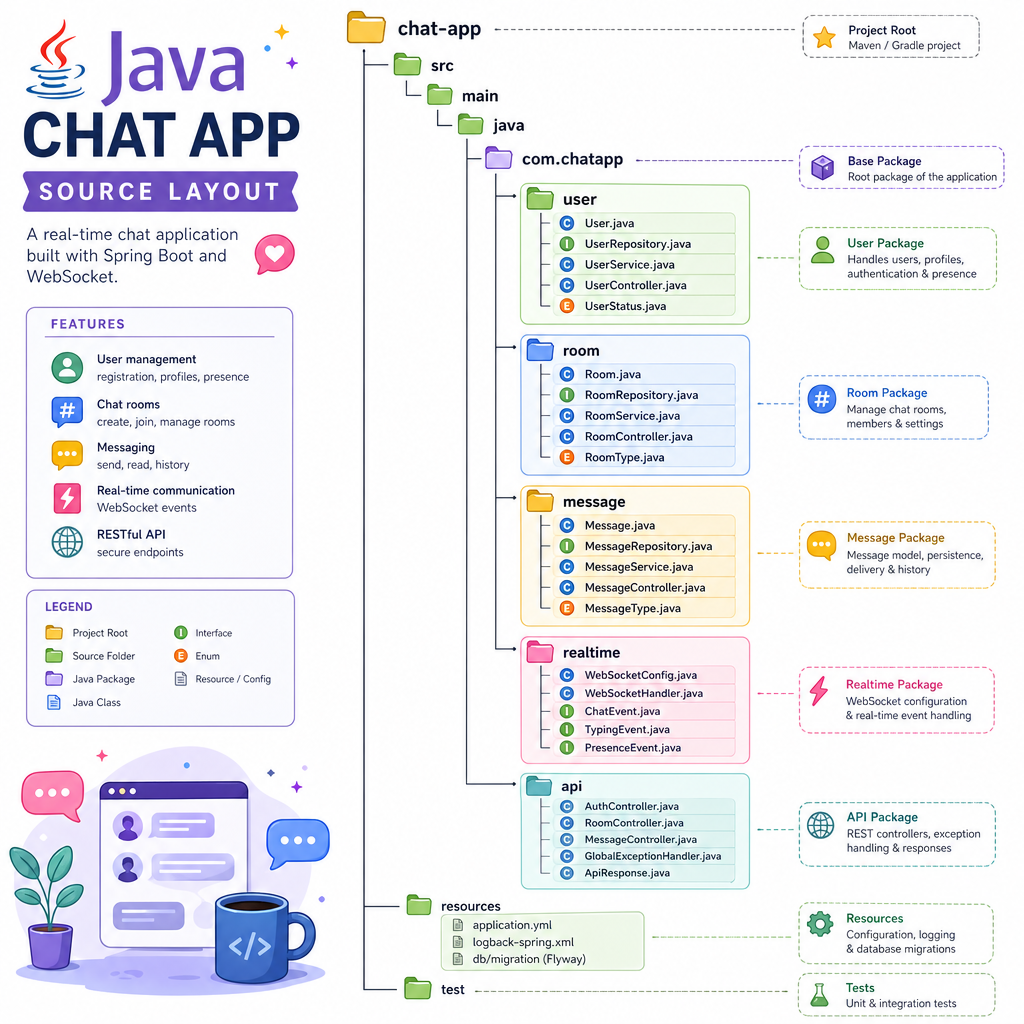
Suggested project source layout
Place the chat application into the layered structure you established earlier in the course.
chat-app/
  src/main/java/com/example/chat/
    ChatApplication.java

    user/
      User.java
      UserRepository.java
      UserService.java

    room/
      ChatRoom.java
      RoomRepository.java
      RoomService.java

    message/
      ChatMessage.java
      MessageRepository.java
      MessageService.java

    realtime/
      ChatWebSocketEndpoint.java
      RoomBroadcaster.java
      ClientSessionRegistry.java

    api/
      RoomController.java
      MessageHistoryController.java
A useful commit sequence:
- Commit the domain model
- Commit the service interfaces
- Commit REST endpoints for room/history reads
- Commit WebSocket send/receive flow
- Commit repository integration for message persistence
This keeps the project easy to review and aligns with the Git working loop from the first lesson.
Project Checkpoint
What you have designed
You now have the core design for a real-time Java chat application:
- REST handles room lists and history retrieval
- WebSocket handles live message delivery
- Services contain business behavior
- Repositories isolate persistence
- Broadcasters notify connected clients
- Domain classes remain understandable without framework noise
This project is a practical bridge between the earlier lessons: setup discipline, design patterns, REST boundaries, and Hibernate persistence all show up in one realistic codebase.
Next, we will focus on Testing and Debugging Java Projects, where this chat application gives us meaningful behavior to verify.